
Key figures
| Duration | 5 days (25 → 29 October 2026) |
| Versions | v1.0 → v1.9 |
| Commands | 61, in 2 modules (Community, Academy), in French and English |
| Academy | 47 CCNA lessons, 498 questions, 92 glossary terms |
| Tickets | 123 ready-to-use templates |
| Security | 5 audits, more than 45 points fixed, 0 secrets published |
About the images
The screenshots of the website and the panel come from the demo mode, which was public until 29 October (no real data). The tool screens (Cloudflare, hosting console, Discord profile…) are recreated illustrations based on the project's real screenshots, keeping the same look without exposing identifiers, IP addresses or personal information. The images are in French, as the project was built in French.
Chapter 1
Context and goals
The starting point
Cyber is a Discord bot created by Enzo Cerejo, a student in BTS CIEL (Cybersecurity, IT and Networks, Electronics), IT and Networks option. The project came from a simple observation: a Discord server often stacks five or six different bots (one for tickets, one for moderation, one for levels, one for giveaways…). Each has its own permissions, its own dashboard, its own outages.
The idea: a single free bot that replaces all the others, plus a learning module to revise networking at CCNA level, which fits Enzo's training.
The goals
| Goal | What it means in practice |
|---|---|
| All-in-one | Moderation, automod, tickets, levels, giveaways, verification, temporary voice channels, roles… |
| Modular | Each server only turns on what it needs (Community and Academy modules) |
| Educational | CCNA lessons, quizzes, glossary, daily challenge, network tools |
| Easy to configure | A web panel in the style of MEE6, with Discord login |
| Safe | No published secrets, minimal permissions, protected panel, personal data under control |
| Professional | Public website, domain name, legal pages, visual identity, preparation for Discord verification |
The long-term vision: "cartridges"
Enzo summed up his vision like this: a server asks for a custom module, Enzo builds it, then gives the server a unique ID. The administrator enters it in the panel ("Add a module") and Cyber installs the module, like the cards inserted into Baymax in Big Hero 6.
At the time of writing, this feature is announced as "Coming soon" in the panel and in the bot's bio: it is not coded yet. The Community and Academy modules, however, can be turned on per server.
Working method
The project was carried out with the help of Claude (Anthropic), used as developer and tutor:
- Enzo acts as project lead and system administrator: he defines the requirements, tests every version on his servers, configures the infrastructure (domain name, Cloudflare DNS, Discord developer portal, GitHub, hosting provider) and approves the security choices.
- Claude writes the code, explains every concept in French, carries out the audits and writes the step-by-step guides.
The rules set from the start:
- Never read, display or publish the
.envfile (bot token, secrets). - Always test before delivering (
node src/check.jschecks every command). - Keep a backup of every modified file.
- Explain simply what changes and what to do next (restart
DEMARRER.bat, publish withPUBLIER.bat).
BTS CIEL skills involved
- Networking: DNS (A, CNAME, TXT, SPF, DMARC records), ports, NAT, IPv4/IPv6, tunnels, HTTPS/TLS.
- Cybersecurity: secret management, least privilege, multi-factor authentication, audits, OWASP (XSS, CSRF, injections), GDPR.
- Systems: Linux hosting in a container (Pterodactyl/Docker), Windows scripts (.bat), backups and restore.
- Development: Node.js, Discord API, Express, HTML/CSS/JS, Git and GitHub.
- Project management: versions, prioritisation, documentation, dealing with a hosting provider (support tickets).
Chapter 2
Project log
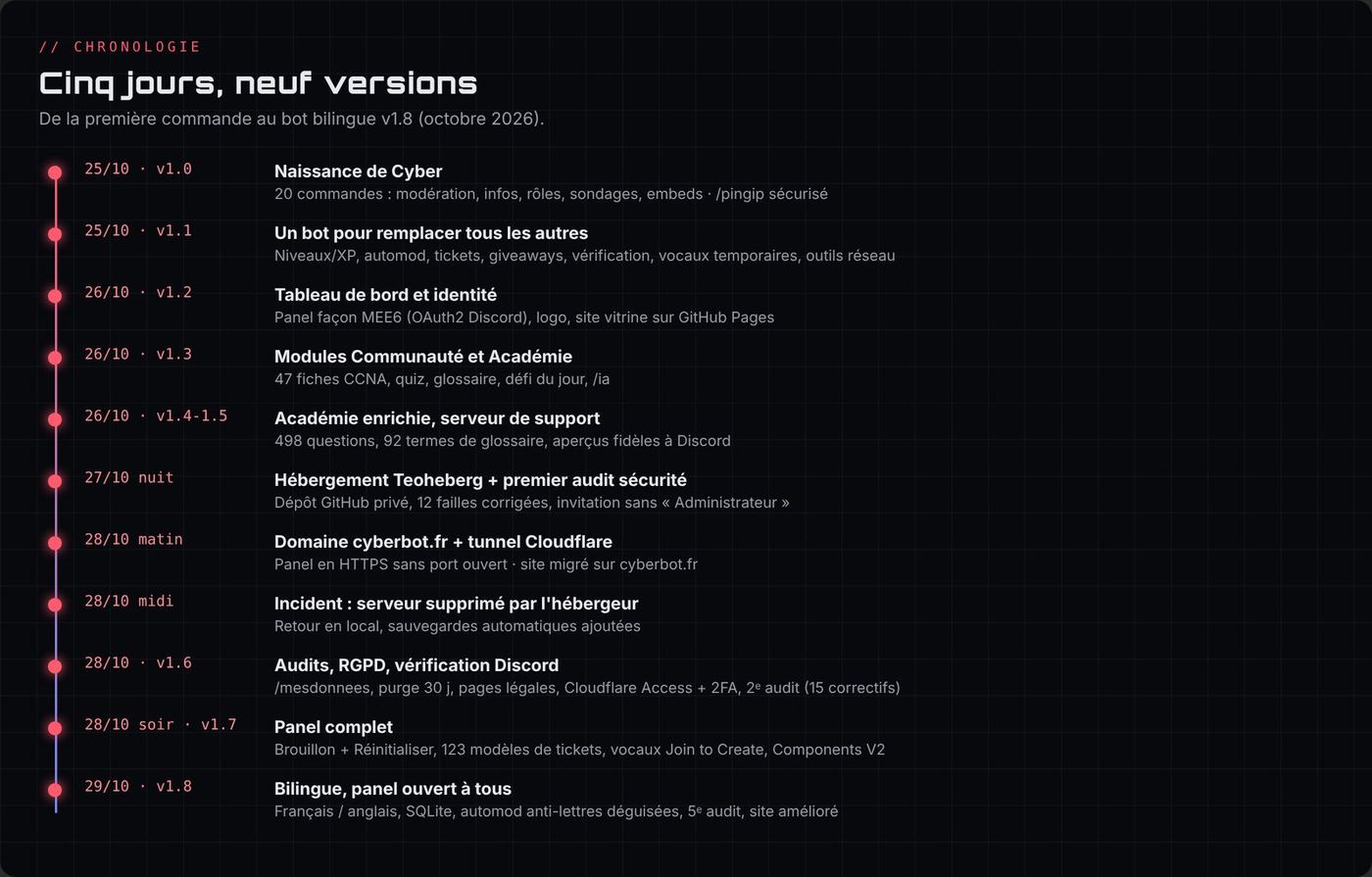
This chapter is the chronological account of the project: what was done, the problems encountered (technical and human), how they were solved and what I learned from them. Times are Paris time.
Key: 🛠️ work done · ⚠️ problem · 💡 solution or decision · 🧠 what I learned
Days 1 and 2 · 25 and 26 October: Cyber is born
It all starts in a first conversation with Claude, titled "Custom Discord bot". My first sentence: "Can you help me create my own Discord bot? The code and everything?", to test it on a server where I am an administrator.
The specification
- 🛠️ My first answers set the course: useful commands, moderation, welcome messages and roles, embeds, account information, and, as a nod to the homelab, an IP ping that gives away no sensitive information. For the language: "pick the most efficient one for heavy use" (it will be Node.js with discord.js).
- 💡 The ambition grows very quickly: "I'd like to replace all the commands of all the other bots", "I want loads of commands, really loads". That is how the goal "one bot instead of MEE6, Carl-bot, Dyno and Ticket Tool" was born.
The logo
- ⚠️ Human problem: I ask for a logo "bright pastel red that looks scary, like the Kali Linux dragon but without looking like it", then "more like a dragon". Claude does not generate images.
- 💡 Solution: "worst case, write me a prompt and I'll ask a specialised AI". This method will be used for all the visuals (chapter 10). The final logo ends up being a red demon mask, which I generated myself.
Step by step in the Discord portal
- ⚠️ "I already added the app to the server but it doesn't show as a BOT." 💡 The application had been invited without the
botscope: the invite link must be generated with the right scopes (botandapplications.commands). - ⚠️ Human problem: "Do you want me to go to CSC and give you access? How? MPC server?" I didn't know how to let Claude work on my PC. 💡 Claude wrote the files itself into a folder on my PC, then gave me a single script to run:
DEMARRER.bat. - ⚠️ Human and security problem: I pasted the bot token straight into the conversation, then refused to change it ("nobody will have the conversation"). 🧠 I understood later that a secret that has been shared must be treated as compromised: all secrets were regenerated on 28 October (chapter 8). That is also where rule no. 1 of the project comes from: the
.envis never read, displayed or published.
The first versions (v1.0 and v1.1)
- 🛠️ v1.0: 20 commands (moderation, information, roles, polls, embeds), welcome messages, auto-role, log channel. From the start,
/pingiprefuses private addresses so it cannot be used to scan my own network. - 🛠️ v1.1: levels, automod, tickets, giveaways, verification, temporary voice channels, network tools. I also ask "where exactly is the bot's folder, how do I start it, and the list of all the commands with what they do".
- ⚠️ Discord rejects
/panelroles: a required option was placed after an optional one. 💡 Order fixed, and thecheck.jsverification script now checks this rule for every command. "It works!" - 💡 My tester feedback: I remove
/8balland/dire("don't like them"), and ask for many more jokes and a more complete/userinfo. - ⚠️ On the portal's Verification Qualifications page, I discover that terms of service and a privacy policy are required. 💡 We put it off: verification is only mandatory from 75 servers (it will be prepared on the 28th, chapter 9).
Hosting the bot and creating the website (v1.2)
- ⚠️ Misconception: "Can I host the bot on GitHub, like my portfolio?" 💡 No: GitHub Pages only serves static pages. It is perfect for the website, but the bot must run on a machine that is always on. Plan: the website on GitHub Pages (free and secure), the bot on my PC for now, then on my own machine later.
- 🛠️ The showcase website is born, first at
enzocerejo.github.io/cyber, with the logo, banner and background I had prepared. - ⚠️ The images didn't show online: the
assetsfolder had never been sent to GitHub, and I had to copy everything by hand after every change. 💡 Creation ofPUBLIER.bat, which publishes the whole folder with Git in one double-click. - ⚠️ After an update, the browser showed the new HTML with the old CSS. 💡 "Cache-busting" version numbers are now added automatically to every file.
- 🛠️ Visual redesign at my request: no more banner or background image ("let your imagination run"), animated network background, "glitch" title, animated Discord demo. I also remove my email from the site: a contact will come with a domain name.
- ⚠️ "Not done properly here, redo it": part of the site was only half styled. Then "mod logo bug": the shield icon on the Moderation card jumped to the edge on hover. 💡 Both fixed (the icon was taking the full width of the card).
- 💡 My question: why not build the panel without the server right now, just to have the visuals ready before Christmas? Result: a preview panel on the website, with the real Discord login, fake channels and a demo mode without an account.
- ⚠️ "Invalid OAuth2 redirect_uri" when clicking "Log in with Discord". 💡 Two causes:
index.htmlin the address, and "Cyber" versus "cyber" (GitHub respects capitals, Discord compares character by character). The address is now normalised. - 🧠 An honest question I asked that evening: "Can a bot entirely coded by an AI really be used without worry?" The answer: yes, if it is properly supervised: tests, audits, no sensitive data, and someone who understands what is delivered. That guided the rest of the project.
- 💡 On the hardware side, I am already talking about future hosting: my father offers to swap his Raspberry Pi 5 8 GB kit for a Pi 5 2 GB. I keep the idea for Christmas (chapter 7).
The two modules (v1.3)
- 💡 My idea: "two parts that can be combined or work independently", the community part (moderation, tickets…) and a cyber part that explains "what firewalls, routers… are, really complete". The choice must be "a simple checkbox or a command". The level: CCNA, with the three modules of the curriculum (ITN, SRWE, ENSA), and an AI that answers questions as long as it's about IT.
- 🛠️ Result: the Community and Academy modules, 47 lessons,
/quiz,/glossaire,/port,/osi,/cisco, the daily challenge and/ia(limited to 5 questions per hour per person). - ⚠️ The commands only appeared on one server: they were registered on a fixed server ID. 💡 Automatic registration on all the bot's servers, and as soon as it joins a new one.
- 🧠 "Is it optimised if one day it's on 150,000 servers?" Honest answer: it's the right method for development, but in production it will need global commands, then mandatory sharding from 2,500 servers and a real database (chapter 12).
The choice on arrival and the animated panel (v1.4)
Monday 26 October, 22:52 · 🛠️ A feature we had discussed didn't exist yet: choosing modules on the first invite. It is created in two places: a welcome message in Discord with three buttons (Community, Academy, Both, reserved to those who manage the server), and a welcome screen in the panel. The panel also gets previews faithful to Discord, an automod simulator, animations and a warning for unsaved changes. The support server is linked everywhere (/aide, website, legal pages).
My tester feedback and the context file (v1.5)
23:17 · ⚠️ I test and list what's wrong: not enough quiz questions, /rappel sends several DMs instead of one, the /afk reply multiplies, and the explanations (DDoS for example) are too short.
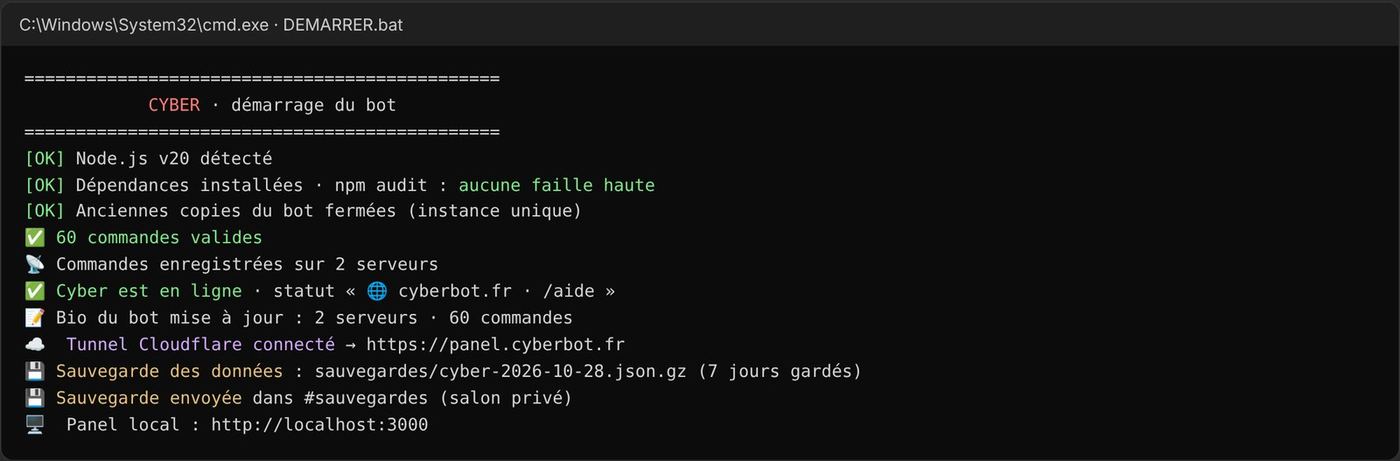
23:19 · 💡 The diagnosis is surprising: it wasn't a bug in the commands. Three copies of Cyber were running at the same time on my PC, because I restarted DEMARRER.bat without closing the old window. Each one answered. The bot now reserves a local port (single instance) and DEMARRER.bat closes the old copies.
23:48 · 🛠️ v1.5: 498 questions instead of 75 (at least 10 per lesson), series of 5 questions per topic with a summary, 47 lessons rewritten 3 to 5 times more detailed, 92 glossary terms (DDoS now details the botnet, attack types, amplification and defences).
- ⚠️ Human problem: the conversation was getting too long and the answers were slowing down. I ask whether I can export it and send it into a new conversation. 💡 It wouldn't be faster. The right solution: a
CONTEXTE-CLAUDE.mdfile that sums up the whole project (security rules, structure, publishing recipes, to-do list), plus the website generation tools copied into the bot's folder. Just write "read CONTEXTE-CLAUDE.md and let's continue".
🧠 A good context file is worth its weight in gold: without it, everything would have to be re-explained every time. And a bug "that repeats itself" is not necessarily in the code: first check how many times the program is running.
Night of 26 to 27 October: first hosting and first audit
23:59 · I pick the project back up with the context file. The bot is at v1.5 (58 commands) and only runs when my PC is on.
00:04 · 💡 Idea: use Teoheberg, a free hosting provider, so the bot runs continuously and I can configure the panel with real data. I send screenshots of the Startup and Network tabs.
00:14 · 🛠️ The bot is adapted (the host's port, command registration at start-up, a PREPARER-TEOHEBERG.bat script that creates a zip without secrets) with a step-by-step guide.
00:42 · ✅ "Looks like it's running fine." But I have lots of questions: is my DEMARRER.bat still useful? How do you update the files over there? Can I host the website too?
💡 Answers: DEMARRER.bat is for testing on the PC (after switching the host off), the website stays on GitHub Pages (free, HTTPS), and for updates a private GitHub repository is better.
00:51 · 🛠️ I choose the private GitHub method and at the same time ask for a full security audit. Result: 4 npm vulnerabilities fixed and 12 flaws in the code, including a serious one: a simple member could become administrator through a badly configured role (details in chapter 8).
01:23 · ⚠️ Human problem: "Where do I put the bot token on GitHub?"
💡 Nowhere! I had mixed up two things: the bot token (secret, only in the .env) and the GitHub token (which lets the host read the private repository).
🧠 There are several "tokens" in a project and each has a different role and risk level.
01:24 · ⚠️ After the first clone on the host: "That's all I have, what do I do?" 💡 That's normal, the .env is deliberately not on GitHub: it has to be created by hand on the server.
01:32 · ✅ Everything works. I want to link the panel to the website. ⚠️ The website is HTTPS and the host is HTTP: browsers block this mix.
01:36 · ⚠️ The panel doesn't open at all (ERR_CONNECTION_TIMED_OUT). 💡 Diagnosis: the host's name goes through Cloudflare, which doesn't let that port through. I open a support ticket with a prepared message.
Wednesday 28 October: the big day
Morning: the tunnel and the domain name
08:53 · ⚠️ Support's answer: the machine has no open inbound port. The panel will never be reachable directly. 💡 Three options: do without the online panel, move to a paid plan, or create a Cloudflare tunnel (the server calls Cloudflare). I choose the tunnel.
09:05 · I ask whether it's secure, then whether SQL injection is possible on the panel login. 💡 The tunnel is encrypted but makes the panel public, so it must be protected. And no SQL injection is possible: there is no SQL database and no password. 🧠 A flaw depends on the technology: no SQL, no SQL injection, but XSS, CSRF, session theft… remain.
10:17 · Choosing the domain name. cyber.com is out of reach. 💡 cyberbot.fr at OVH, about €6.
10:38 · ⚠️ Trap avoided: DNSSEC, enabled by default, would have cut the domain off when moving to Cloudflare. I remove it before paying.
10:47 · ✅ cyberbot.fr is mine.
10:52 → 11:03 · ⚠️ Interface problem: Cloudflare has reorganised its menus. I end up in "Register domain" (buy) instead of "Onboard a domain" (add), then "Networks" is no longer where expected. 💡 Quick search (Ctrl + K) solves it. Along the way, I add SPF and DMARC against email spoofing, and change the DNS servers at OVH.
11:06 · ⚠️ Zero Trust asks for a bank card even for the free plan. 💡 Nothing is charged as long as you stay on Free.
11:15 · 🛠️ Tunnel created. I copy the token without ever sending it in the conversation.
11:20 · ⚠️ "I can't click Next if it's not connected…" 💡 We swap the order: first the .env and the restart, then the route.
11:22 · ✅ cloudflared runs on the host, the tunnel is connected.
11:27 · ⚠️ DNS error on panel.cyberbot.fr. 💡 Two causes: the route hadn't been added yet, and the domain was still "pending" at Cloudflare. Then ipconfig /flushdns on the PC, because Windows had cached the "doesn't exist".
12:08 · ✅ The domain is active.
Noon: the incident
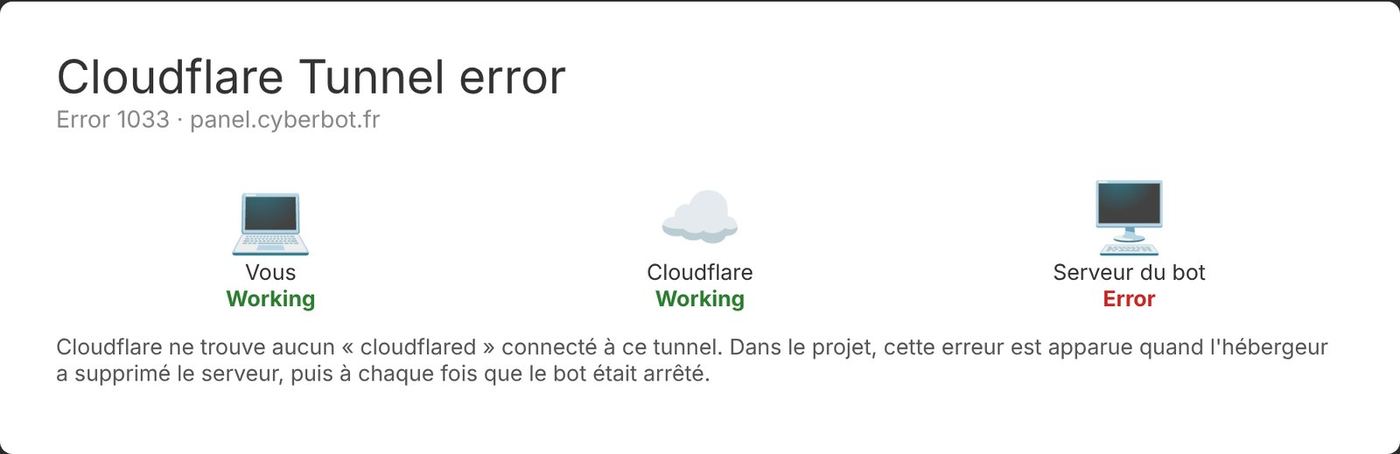
12:19 · ⚠️ Error 1033: Cloudflare can no longer find any connector.
12:21 · The tunnel is "Down".
12:23 · ⚠️⚠️ "I don't have a server any more?" The server has been deleted by the host. It no longer appears anywhere. The data (data/: levels, settings) is lost, except an older copy on my PC.
💡 No panic: I don't recreate anything before knowing why, I open a ticket (written for the occasion, being transparent about the tunnel), and I restart the bot on my PC with DEMARRER.bat.
🧠 A free host can disappear overnight. Without a backup, you lose everything. That is what triggered the automatic backups that same afternoon.
12:33 · Rather than waiting, we move on two fronts in parallel: moving the website to cyberbot.fr, and redoing the panel's interface.
Early afternoon: the website on cyberbot.fr and the new panel
13:38 · 🛠️ Four A records pointing to GitHub Pages and a www CNAME, all "DNS only". Domain verification in GitHub with a TXT record.
13:44 · ✅ "DNS check successful". GitHub prepares the HTTPS certificate on its own.
13:47 → 14:04 · ⚠️ Tool problem: Claude can't connect to my PC to modify the files. I don't know where "Remote Control" is. 💡 In the end, I give access to the Cyber folder that holds the bot and the website.
13:55 · Bonus question: "the interface looks more zoomed in". 💡 Normal: the browser remembers a zoom level per address, and cyberbot.fr starts again at 100%.
14:07 · 🛠️ CNAME file, links updated everywhere, PUBLIER.bat that first fetches the changes made online. Python isn't installed on my PC, so the build is reproduced by hand.
14:20 · ✅ The website is live at https://cyberbot.fr.
12:33 → 15:53 · Panel redesign: three styles proposed, I choose "Cyber console". The changes arrive in a pull request. ⚠️ Human problem: I'm asked "ok" at every step and it slows everything down. 💡 I answer "no need for ok": from now on, reversible steps are done directly (with a backup), only irreversible actions are asked. ⚠️ "What does merging the PR mean?" 💡 A PR is a proposed change; "Merge" accepts it and updates the website. I merge PR #1. 🧠 I learned the Git vocabulary in practice: branch, pull request, merge, revert.
15:03 · 🛠️ GitHub ruleset on main: deletion and force push forbidden.
Afternoon: the global audit and the panel's lock
15:06 · I ask for an audit of everything: security, errors, optimisation.
15:12 · Report: no secret leak. 1 critical point (regenerate the secrets that were on the deleted server), 5 important, 12 minor.
15:34 · I answer point by point. I choose what to fix, what we do together, what I'll be reminded of later. For giveaways, I refuse a fixed 30-day purge (some last longer): 💡 the count now starts from the end of each giveaway, with a duration each server can set.
16:19 · 🛠️ Automatic daily backups, RESTAURER.bat, scheduled reminders from 26 December to 3 January for the points linked to the future server. Backups go to Discord rather than GitHub (no write token to give the bot).
16:32 · 🛠️ Dependabot and Malware alerts enabled, but not automatic updates, which would have blocked my pushes.
16:39 → 18:06 · Cloudflare Access, the most laborious part of the day:
- ⚠️ I ask whether we can add an authenticator app. 💡 Yes: TOTP MFA on top of the email code.
- ⚠️ Login loop: "That account does not have access". The page offered to log in with my Cloudflare account (another email address) while only my authorised address has access. 💡 Enable the One-time PIN method only.
- ⚠️ Landing on a "Welcome" page instead of the panel. 💡 It's the App Launcher, disabled by default. It is what lets you register the authenticator app: it needs the same rule.
- ✅ Bitwarden registered. I rename the randomly generated team ("royal-cake-…") to
cyberbot-team. - ✅ Test: email, code and Bitwarden pass, then error 1033… normal, because the bot is off. 🧠 "Zero trust" security is configured in layers, and each layer has its own screen. Test after every change.
18:15 → 18:40 · All secrets regenerated and a new .env (filled in by me, never shown). ✅ "All done."
In parallel: where to host Cyber for good?
16:19 → 21:00 · I wonder whether a Raspberry Pi 5 is the right choice. ⚠️ Human problem: I point out that the 2 GB Pi was for my father and that I was aiming for the 8 GB one, so the comparison has to be redone. ⚠️ The first prices given were too low: in 2026, RAM had gone up a lot. The correction was made honestly, with real links. ⚠️ Budget constraint: new is too expensive for a student, and an SFF PC too bulky. 💡 A refurbished "1 litre" mini PC (EliteDesk Mini, ThinkCentre Tiny, OptiPlex Micro). I compare second-hand listings, and for each I get an opinion and a message ready to send to the seller. Purchase planned for Christmas, without a screen.
Evening: visual identity
19:43 · 🛠️ Pack of 57 prompts to generate all the visuals with a strict style guide (palette, fonts, demon mask). 21:35 · ⚠️ ChatGPT stops at image 7 (free quota). Gemini takes over, then stops too. 💡 Decision: generate a bit every day, each time the quotas reset. The images are cropped to the right sizes as they come. 22:09 · 🛠️ Avatar, banner and bot description set in the portal. Application moved into a Discord team (2FA is mandatory for that). 23:06 · ⚠️ The banner looks bad in the small view: pink appears and the text is cut off. 💡 The generated image was semi-transparent and Discord put its colour behind it. Opaque version, centred text.
Evening: Discord verification and GDPR
22:28 → 22:49 · 🛠️ /mesdonnees, automatic deletion 30 days after a server removes the bot, rewritten legal pages and legal notice. I open and merge PR #2 myself. ✅ "Everything is tested."
22:49 · I find two mysterious fields in the portal. 💡 Leave them empty: one of them would have cut off every command.
Evening: the tunnel comes back to life from my PC
22:53 · "Do we carry on without a server?" 💡 Yes: the tunnel can start from my PC.
22:57 · ⚠️ Nothing happens. 💡 The TUNNEL_TOKEN line was still commented out (#) in my .env. Good point though: I had hidden my secrets before sending the screenshot.
22:59 · ⚠️ The tunnel refuses to start. 💡 I had put the fingerprint of the Linux version of cloudflared while the PC downloads the Windows version. Security did exactly its job.
23:01 · ⚠️ "Bad gateway". 💡 The route still pointed to the old port, and localhost went out over IPv6 (::1). Fix: 127.0.0.1:3000.
23:03 · ⚠️ Misunderstanding: "I haven't changed anything at all, what are you on about?" Claude had assumed I had already changed the route. 💡 Apologies and a step-by-step explanation.
🧠 Never assume a step is done: check the screenshot before claiming it.
23:05 · ✅ https://panel.cyberbot.fr works: email code, Bitwarden code, Discord login, then the panel.
Late evening: finishing touches
23:07 · ⚠️ "I still don't have a backup in my channel, is that normal?" 💡 No, it was a bug: the day's backup had been created before the channel was configured, and it was never sent again. Fixed. 23:14 → 23:23 · 🛠️ Second full audit ("I want everything spotless"): 15 small holes fixed, including possible cheating in the quiz. 23:17 · 🛠️ Permanent status "🌐 cyberbot.fr · /aide". 23:21 · 🛠️ Automatic bio with the real figures. I explain my vision of custom modules ("Baymax's cartridges"), announced as "Coming soon" since it isn't coded yet. 23:29 · 🛠️ Complete template for the Discord support server: 12 categories, 35 channels, 15 roles. 23:48 · I go through every panel setting and list 7 improvements. I specify along the way that the challenge leaderboards must stay in the channel. 00:17 · ✅ Panel v1.7 installed: draft and Reset, 123 ticket templates, Join to Create voice channels, private daily challenge, Components V2. 60 valid commands. 00:19 · I confirm Cyber has the Administrator permission on my server, so nothing to change for voice channels.
00:24 · I start this documentation. 📘
Thursday 29 October: Cyber opens up to the world
That night: verifying new members
00:37 · 🛠️ The support server's rules get their button: it gives the "Member" role and removes "Unverified". 00:43 · ⚠️ I check: "Did you make sure the Unverified role is given to every new member, then removed after verification?" 💡 Not automatically yet: you had to go through the auto-role. The panel now does it on its own. 00:53 · 🛠️ Verification tab in the panel: choose or create both roles, 17 rule templates with preview, option to hide channels from unverified members. In the same half-hour, the website's new icon and this documentation go online.
Morning: preparing the homelab
10:29 · Question: "Can Proxmox and my bot run together on the same PC?" 💡 Yes, that's the idea: Proxmox is the base, and each project lives in its own virtual machine, isolated from the others. With 16 GB of RAM, the bot, an ad blocker and BTS labs (pfSense, Windows Server) fit together.
Early afternoon: three projects in parallel
13:44 · 💡 "Could we add a bit of AI to the automod, which can be bypassed with two or three text changes?" 13:46 · ⚠️ Human problem: "How much does it cost me? I don't want to burn my tokens easily." 💡 The bot's AI would use an API key separate from my subscription, about 5 cents per 1,000 messages. 13:48 · "Let's stay normal for now." 🛠️ Only the free layer is done: the automod now unmasks disguised letters (foreign alphabets, invisible characters, stylised letters, words split by a symbol). 🧠 Good free protection first, the paid option only when the need is proven.
13:49 · I ask what could be improved on the website. Claude suggests 10 ideas ranked by priority, I answer "all of them". 13:59 · 🛠️ Improved website (PR #6, merged at 14:06): 404 page, sitemap for Google (sitemap.xml and robots.txt), WebP images (logo 26 times lighter), link previews when shared, "Cyber in pictures" section, 3 new FAQ questions, live counter of support server members, link to the documentation, English home page and a "Custom modules" page (announced as "Coming soon").
14:03 · 💡 "Is it possible to have a French / English bot? Users choose the language, in every command, and don't forget to update future commands."
⚠️ Organisation problem: the request first goes into a new thread, then comes back to the panel thread, as my rule "big bot change = panel thread" required. Two contradictory messages in one minute. 💡 Fixed straight away, and the rule is now applied without exception.
14:21 · 🛠️ Bilingual v1.8 ready: 860 texts translated, /langue for each member, /config langue for the server, English command names. ⚠️ But my PC is offline: impossible to install it.
14:25 · 🧠 "What's a PR? And what's it for?" Explanation: a proposed set of changes, reviewed then merged in one click, and reversible. Conclusion: a PR when my PC is off or for a big change, PUBLIER.bat the rest of the time.
14:32 · On the homelab side, my father will buy the chosen mini PC on Saturday, with leboncoin's secure payment.
14:48 · ⚠️ On the English page, some tabs are missing from the top bar. 💡 Menu aligned with the French version (PR #7, merged at 15:03).
Mid-afternoon: opening the panel to everyone
16:10 · I look for cheap hosting until January. 💡 Advice: Hetzner (about €4 a month, no commitment), not the "free" offers that already cost me a server. 16:21 · The real need appears: "I want people to have access to the config panel, secure, without interruption". 16:22 · "Can we already create the secure path to the panel for everyone, without the server?" 💡 Yes: the path already exists (the tunnel). Only the Cloudflare Access lock, set for me alone, blocks the others. 16:35 · "Between the website and the panel, is it secure?" The question goes to the audit thread, as my rule says. 16:36 · 🛠️ Audit no. 5: a single hole (a moderator could move the log channel from the panel), and the old preview panel's "weird token login" is replaced by a link to the real panel. 16:38 · 💡 Decision: hosting will wait a few days, I want to finish opening the panel "today and tomorrow". 16:39 · ⚠️ My PC stops responding (asleep). Everything is ready but nothing can be installed. 16:45 · "What could a database be used for?" 💡 Robustness in case of a power cut, speed with many servers, sessions that survive restarts. 16:46 · "Can I use SQLite now?" 💡 Yes, with the SQLite built into Node.js, so no extra module to monitor.
Late afternoon: everything gets installed
17:14 · My PC is back: "install now".
⚠️ Organisation problem: three threads had changes ready for the same files (automod, bilingual version, audit), and the website folder on my PC was behind GitHub. 💡 A precise installation order: the automod (a single file), then v1.8, then the audit on top. Each time with a backup and a comparison before writing. And a new script, SYNCHRONISER-SITE.bat, brings the website folder up to date without losing anything, so that PUBLIER.bat doesn't hit a conflict.
17:16 · ✅ Stronger automod installed.
17:21 · ✅ Bilingual bot installed. Website updated (PR #8).
17:28 · ✅ SQLite and public panel installed, tested with v1.8: 61 valid commands, data imported automatically.
17:30 · 🛠️ The support server becomes bilingual: a channel to pick your language, French and English rules, channels for each language.
17:36 · I do my part: Cloudflare Access deleted, old Discord redirect removed, .env modified. I send an excerpt of the .env with the secrets replaced by "HIDDEN". 🧠 The right reflex, first time round this time.
17:45 · "When people open it, it doesn't show this page, does it? And could you add a dino game like Google's, in our colours, in case it takes a while?" 💡 No copy of Google's game (it's protected): an original game where the Cyber robot jumps over bugs.
17:46 · "Cookies to keep the Discord login and the leaderboard?" 💡 The login is now kept for 7 days, even after a restart. A global leaderboard is not recommended: scores would be too easy to fake. The high score stays in the browser.
17:55 · ✅ Waiting page online (PR #11).
18:03 · ✅ "It works well, I asked a mate!" The panel is open to everyone, tested by someone other than me.
18:06 · The mini PC is chosen for good: an HP EliteDesk 800 G5 Mini with 16 GB of RAM, for €220.
18:12 · I ask to keep feeding this documentation with the new features. 📘
🧠 The lesson of the day: when several projects move forward at once, the most important thing is not speed, it's the order in which you install, with a backup at every step.
Friday 30 October: v1.9, clearer for everyone
A long list in one go, with one watchword: "also check all the consistency shown on the dashboard and on the website".
- 🧩 The Academy becomes an add-on module, "made out of passion", and is no longer offered on arrival. Community + Security are active straight away. The website gets an animated guided tour (Community → Security → Modules) and a Modules section.
- 🌐 English commands for everyone (
/help,/learn…), it's more standard. And language per channel: a server can speak French in some channels and English in others. - 🗂️ Panel: the sub-sections of each tab are shown in the menu to jump straight to them, modules are placed at the top in a drop-down menu, and Public modules separates installed modules from search (most installed, best rated, by name or by ID).
- 📊 More detailed "Choose a server" page and boosts in the preview.
- 📜 Rules: an advanced Discohook-style mode with several coloured cards, titles, separators and images.
The next morning, a second wave:
- 🎓 "We need to stop talking about the Academy module as a default module of the bot." It becomes a small optional module, made out of passion for network infrastructure: no longer in the bio or the welcome message, and its commands don't even appear in the "/" menu of servers that haven't installed it.
- 🌐 Bilingual channels: a 🇬🇧 English / 🇫🇷 Français button under Cyber's messages, which switches the message's language in place.
⚠️ Problem: when command names switched to English, a text that mentioned several commands on the same line only translated the first one. 💡 Fixed and checked across all the texts of the bot, the panel and the website.
Log summary
| Indicator | Value |
|---|---|
| Duration | 6 days, including one day of more than 15 hours |
| Versions | v1.0 → v1.9 |
| Commands | 20 → 61 |
| Languages | French and English |
| Security audits | 5 (more than 45 points fixed) |
| Pull requests on the website | More than 10 |
| Major incidents | 1 (server deleted by the host) |
| Data lost | That of the hosted server (automatic backups exist since) |
Chapter 3
Technical choices
The building blocks
| Block | Technology | Why this choice |
|---|---|---|
| Bot | Node.js 24 LTS (20 at first) and discord.js 14 | The most used library for Discord, well documented, handles slash commands, buttons, menus and Components V2 |
| Panel | Express (Node web server) + HTML/CSS/JS without a framework | Lightweight, runs in the same process as the bot, no heavy dependency |
| Data | JSON files at first, then SQLite (data/cyber.db) since 29 October |
JSON was enough for a few servers. SQLite copes better with a power cut in the middle of a write, only rewrites the changed rows and keeps the panel sessions. The one built into Node.js adds no dependency to monitor. |
| Languages | Home-made dictionary src/i18n/ (French → English) |
Translation at send time: existing commands barely changed, and check.js verifies that no translation is missing |
| Website | Static HTML/CSS/JS generated by a Python script (build.py) |
Free HTTPS hosting on GitHub Pages |
| Domain | cyberbot.fr bought from OVH | A .fr for a French-speaking bot, low price, contact details hidden in Whois for an individual |
| DNS, HTTPS, access | Cloudflare (free plan) | Fast DNS, outbound tunnel, Access (login with a code + 2FA, used during the test phase) |
| Source code | GitHub: public repository for the website, private repository for the bot | The website has no secrets; the bot's code stays private |
| AI (optional) | Anthropic API (/ia command) |
Only enabled if an API key is present, with usage limits |
Folder layout
On Enzo's PC, everything sits in a Cyber folder:
| Folder | Content | Public? |
|---|---|---|
bot-cyber |
The bot, the panel, the tools (Academy and website generators) | Private (contains the .env) |
cyber-site |
The showcase website and the demo panel | Public: this repository, published at https://cyberbot.fr |
Bot structure:
src/index.js              start-up (single instance, events, clean shutdown)
src/deploy-commands.js    registers the commands on every server
src/loader.js             loads src/commands/<category>/*.js
src/commands/             one command = one file
src/events/               interactions, messages (automod, XP, AFK), joining/leaving a server…
src/utils/                store (JSON), modules, scheduler, security, backups, tunnel, bio…
src/academie/             Academy content (lessons, quizzes, glossary) + daily challenge engine
src/dashboard/            Express server for the panel (OAuth2, CSRF, CSP) + interface
src/check.js              checks every command before each release
outils/academie/          Academy text sources + generator
outils/site/              website sources (*.main.html) + build.py
"One double-click" scripts
Enzo does not code: every routine operation fits in a Windows .bat file.
| Script | Role |
|---|---|
DEMARRER.bat |
Checks Node, installs dependencies, runs npm audit, registers the commands, closes old copies and starts the bot |
PUBLIER.bat |
Sends the website to GitHub (commit, fetch the changes made online, then push) |
ENVOYER-GITHUB.bat |
Sends the bot's code to the private repository, after checking that no secret or data leaves |
RESTAURER.bat |
Restores a backup: just drag the .json.gz file onto it |
Key choices and why
- Commands registered per server rather than globally: they appear instantly during development. A "global commands" option is planned for production.
- Single instance: the bot reserves a local port. A new copy asks the old one to stop. This fixes a real bug: several copies were running at the same time and every command answered twice.
- Minimal permissions on invite: instead of asking for "Administrator", the invite only lists the permissions that are needed.
- No password in the panel: login goes through Discord (OAuth2). There is no password to store and no SQL database to protect.
- A single panel: at first, the website had a demo panel (the same
app.jswith an "adapter" that simulated the API). Since 29/10/2026,cyberbot.fr/panel/is a waiting page that sends you to the bot's real panel (panel.cyberbot.fr); the demo copy was removed.
Chapter 4
The bot and its commands
Version by version
| Version | Date (2026) | Main content |
|---|---|---|
| v1.0 | 25 October | First 20 commands: moderation, information, roles, polls, embeds. Welcome message, auto-role, log channel. /pingip refuses private addresses. |
| v1.1 | 25 October | "Enough to replace all the other bots": levels and XP, automod, tickets, giveaways, anti-raid verification, suggestions, tags, temporary voice channels, /rappel, /afk, /snipe, network tools, /aide menu. |
| v1.2 | 26 October | MEE6-style dashboard with Discord login, new logo, complete /userinfo, /blague, website launch. |
| v1.3 | 26 October | The two modules (Community, Academy); 47 CCNA lessons, /quiz, /glossaire, daily challenge, /ia. |
| v1.4 | 26 October | Choosing modules when joining a server, previews faithful to Discord in the panel, automod simulator, support server. |
| v1.5 | 26 October | Bigger Academy: 498 questions, series of 5 per topic, rewritten lessons, 92 glossary terms; duplicate answers fixed. |
| v1.6 | 27-28 October | Hosting through private GitHub, security audit, /mesdonnees, automatic deletion 30 days after removal, daily backups, legal pages. |
| v1.7 | 28 October | Panel rebuilt (draft + Reset, Security and Public modules tabs), automod library, 123 ticket templates, "Join to Create" voice channels, private daily challenge with leaderboard, messages in Components V2. |
| v1.7+ | 29 October (night) | Verification with "Unverified" / "Member" roles given and removed automatically, rules editor with 17 templates in the panel. |
| v1.8 | 29 October | Bilingual French / English bot (/langue, /config langue, 860 texts translated, English command names), automod that unmasks disguised letters, panel open to everyone, SQLite storage, waiting page with a mini-game. |
| v1.9 | 30 October | English command names for everyone (/help, /learn…), language per channel (French, English or both), Academy becomes an optional module (Community + Security by default), Public modules with ratings and search, sub-sections in the panel menu, boosts in the preview, Discohook-style advanced rules. |
The modules
Since v1.9, Community + Security is the base, active from the moment the bot joins. Other modules are installed from the panel's Public modules tab.
Community + Security: moderation, automod, levels and XP, tickets, giveaways, anti-raid verification, suggestions, tags, button roles, temporary voice channels, fun and utilities.
Academy, an optional module made out of passion (CCNA level, ITN / SRWE / ENSA curriculum):
/apprendre: 47 detailed lessons, with examples and Cisco commands;/quiz: 498 questions, series of 5 per topic, points, winning streaks and leaderboard;/defi: a quiz every day in a dedicated channel, played privately, with a leaderboard published every day;/glossaire(92 terms),/osi,/port,/cisco;/ia: IT questions to Anthropic's AI, limited to 5 per hour per member and 50 per day per server;- network tools:
/sousreseau,/dns,/convertir,/pingip.
Up to v1.8, Cyber asked on arrival to choose Community, Academy or both (image below). Since v1.9, this choice is gone: Community + Security is active immediately, and the welcome message only gives the links to the dashboard, the website and support.
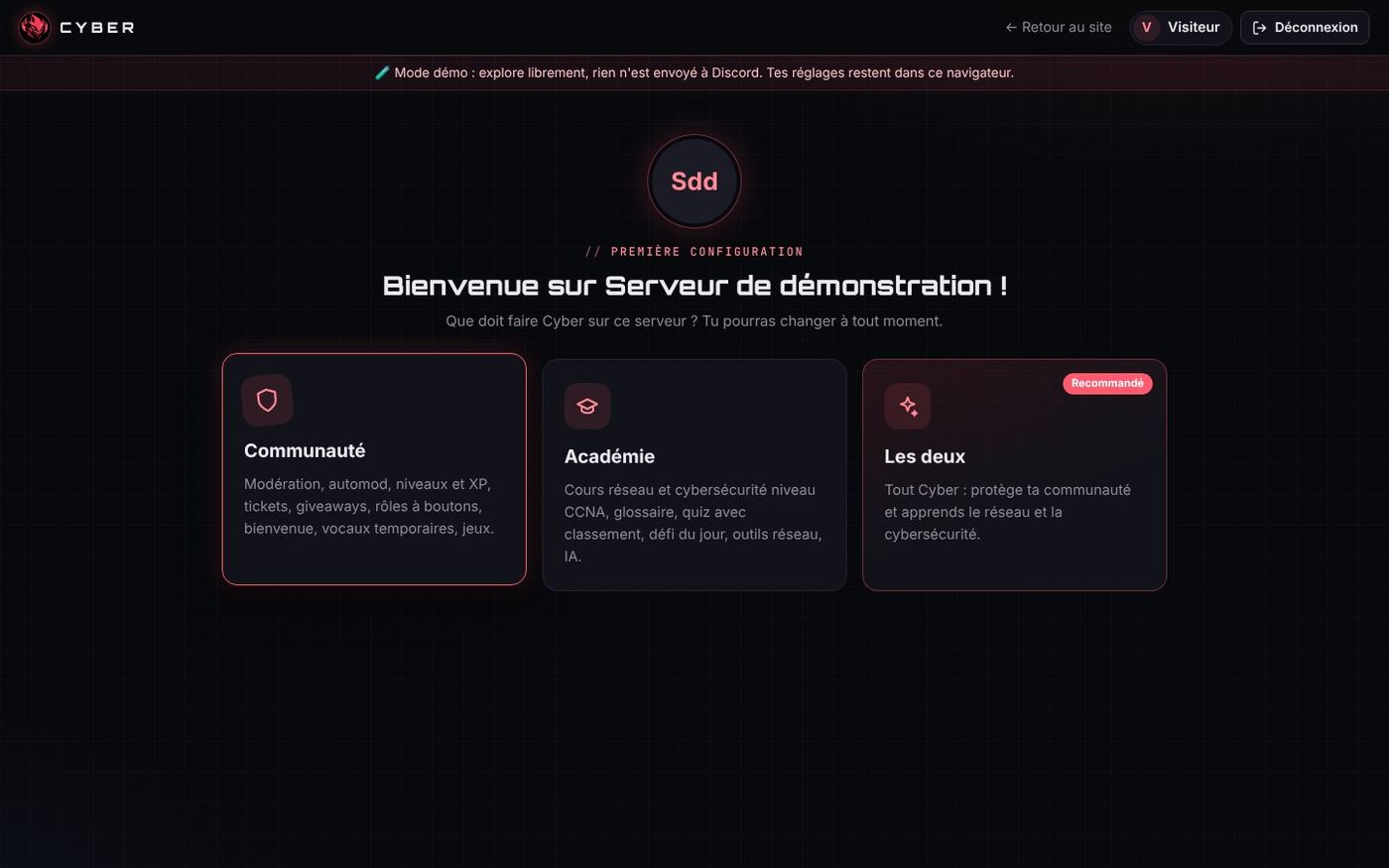
Cyber speaks French and English (v1.8)
Request of 29 October: "let users choose the bot's language, in every command, and don't forget to update future commands in English / French".
- Server language:
/config langueor the panel's General tab. It is used for public messages (welcome, logs, tickets…). - Each member's language:
/langue. The replies, buttons and forms they receive follow their choice. - English names in the "/" menu when Discord is in English (
/help,/learn…). - How it works: an
src/i18n/folder maps each French text to its translation (860 texts). Translation happens at send time, just before conversion to Components V2. The commands' code therefore barely changed. - Rule from now on: every new command must be translated, and
check.jsblocks the release if an English name or description is missing. - The Academy lessons stay in French for now.
Since v1.9 (30 October):
- Commands are named in English for everyone (
/help,/learn,/config language…), with their description in French if Discord is in French. It's more standard, and the same name works everywhere. The code keeps the French names: the bot renames them on receipt. - Language per channel: a server can be in French, English, or both; in that case, the admin picks the channels or categories where Cyber writes in English (
/config languageor panel). A member's personal/languagechoice still takes priority.
How it works inside
- One command = one file in
src/commands/<category>/. Each file exports its definition (data), its execution (execute) and, if needed, the handling of its buttons and autocomplete. - Button routing by prefix: a button whose ID starts with
ticket:is sent to the/ticketcommand's file. - Scheduler (
scheduler.js): reminders, end of giveaways, daily challenge, backups. A lock prevents two runs at the same time. - Components V2: since v1.7, a module automatically converts every embed sent into a Components V2 container, Discord's newest format, with a fallback to a classic embed if the message is too long.
- SQLite storage (since 29 October): data moves from JSON files rewritten in full every 2 seconds to a
cyber.dbdatabase that only modifies the changed rows. It uses the SQLite built into Node.js (no module to download), imports the old JSON files on its own on first start and falls back to the old storage if Node.js is too old. - Automatic check:
node src/check.jschecks every command (names, options, Discord limits) before each release.
Automatic status and bio
- Fixed status "🌐 cyberbot.fr · /help", reapplied every 10 minutes and after each reconnection (it replaces a rotation of 5 statuses).
- Living "About me" bio: every 30 minutes, if the figures have changed, the bot updates its own description with the number of servers, members and commands (400 characters maximum).
Full list of the 61 commands
English names since v1.9 (the original French name stays in the code).
🧰 Utilities (17)
| Command | Description | Staff only |
|---|---|---|
/afk |
Says you are away (Cyber replies when someone mentions you) | |
/help |
List of all Cyber's commands | |
/avatar |
Shows a member's avatar in full size | |
/banner |
Shows a member's profile banner | |
/botinfo |
Information about the bot | |
/calc |
Calculator (+ - * / ^ %, sqrt, sin, cos, log, pi…) | |
/emoji |
Enlarges a custom emoji | |
/language |
Choose the language Cyber replies to you in | |
/members |
Server member statistics | |
/mydata (view, erase) |
View or erase the data Cyber keeps about you | |
/ping |
Bot latency | |
/remind |
Cyber reminds you of something later (by DM) | |
/roleinfo |
Information about a role | |
/server |
Information about the server | |
/snipe |
Shows the last deleted message in the channel | yes |
/poll |
Creates a poll with reactions | |
/userinfo |
Detailed information about an account |
🎓 Academy (8)
| Command | Description | Staff only |
|---|---|---|
/learn |
Networking / cybersecurity lesson (CCNA level) | |
/cisco |
Cisco IOS command cheat sheet | |
/challenge (enable, disable, now) |
Daily challenge: a networking / cyber quiz every day, with a leaderboard | yes |
/glossary |
Detailed definition of a networking / cybersecurity term | |
/ai |
Ask Cyber's AI an IT question | |
/osi |
The OSI model, layer by layer | |
/port |
Which service uses this port? (or the reverse) | |
/quiz (play, leaderboard, stats) |
CCNA-level networking / cybersecurity quiz |
🌐 Network tools (4)
| Command | Description | Staff only |
|---|---|---|
/convert |
Converts a number (decimal, binary, hex, octal) | |
/dns |
Queries the DNS of a public domain name | |
/pingip |
Pings a public IP address or a domain name | |
/subnet |
IPv4 subnet calculator |
📈 Levels (4)
| Command | Description | Staff only |
|---|---|---|
/leaderboard |
Top 10 most active members | |
/rank |
Your level and XP | |
/reward (add, remove, list) |
Roles given automatically at a level | yes |
/xp (add, remove, reset) |
Manage members' XP | yes |
⚙️ Systems (7)
| Command | Description | Staff only |
|---|---|---|
/automod (enable, filter, word, allow, exempt, sanction, view) |
Automatic moderation | yes |
/giveaway (start, end, reroll) |
Contest with a random draw | yes |
/suggest |
Suggest an idea for the server | |
/tag (view, create, delete, list) |
Saved replies (rules, links, FAQ…) | |
/ticket (panel, close, add, remove) |
Support ticket system | |
/verification |
Anti-bot verification panel (button that gives a role) | yes |
/voice (rename, limit, status, panel) |
Set up your temporary voice channel |
🛡️ Moderation (9)
| Command | Description | Staff only |
|---|---|---|
/ban |
Bans a user | yes |
/clear |
Deletes messages in this channel | yes |
/kick |
Kicks a member | yes |
/mute |
Temporarily mutes a member (timeout) | yes |
/nickname |
Changes a member's nickname on the server | yes |
/channel (lock, unlock, slowmode) |
Manage the current channel | yes |
/unban |
Unbans a user by ID | yes |
/unmute |
Removes a member's mute | yes |
/warn (add, list, clear) |
Manage warnings | yes |
🎭 Roles (2)
| Command | Description | Staff only |
|---|---|---|
/rolepanel |
Creates a panel where members pick their roles with buttons | yes |
/role (give, remove) |
Give or remove a role | yes |
🎲 Fun (7)
| Command | Description | Staff only |
|---|---|---|
/joke |
A random joke or riddle | |
/choose |
Picks at random among several options | |
/compatibility |
Compatibility rate between two members | |
/dice |
Rolls one or more dice | |
/rate |
Cyber rates anything out of 10 | |
/rps |
Rock, paper, scissors against Cyber | |
/coinflip |
Flips a coin |
🔧 Admin (3)
| Command | Description | Staff only |
|---|---|---|
/config (welcome, logs, autorole, levels, voice, suggestions, giveaways, language, view) |
Bot configuration on this server | yes |
/embed |
Creates a custom embed message (announcement, rules…) | yes |
/modules |
Turn Cyber's modules on or off on this server | yes |
Chapter 5
The admin panel
The panel is a website built into the bot that lets you set everything up without typing a command. You log in with your Discord account, then pick a server on which you have the "Manage Server" permission.
The real panel is online at https://panel.cyberbot.fr, open to everyone since 29 October. Before that date, the website offered a demo version ("Try without an account" button), with the same code but settings kept in the browser. All the screenshots in this chapter come from that demo mode, so there is no real data in them.
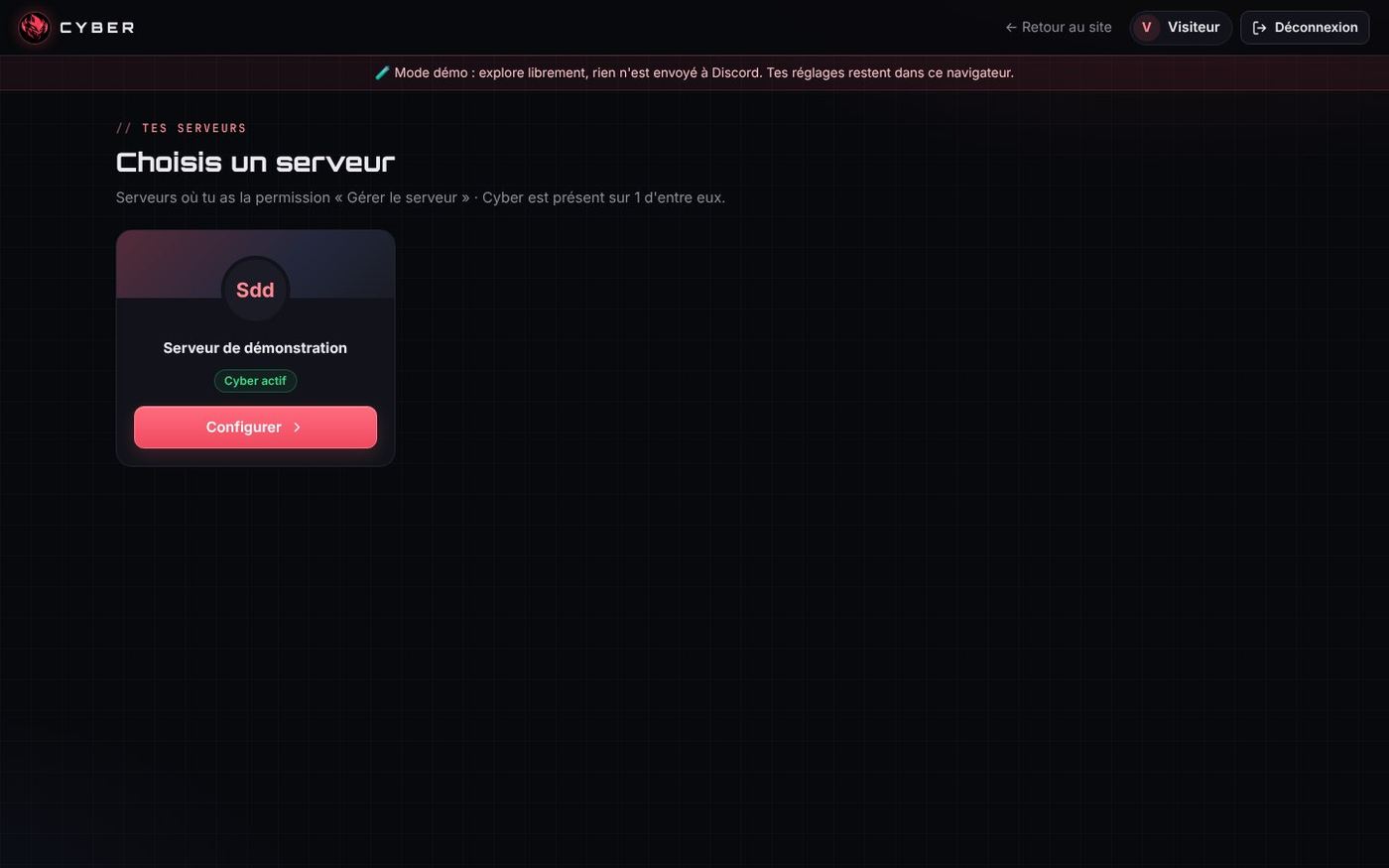
Step 1 · First panel (v1.2 to v1.4)
- Discord OAuth2 login, settings in a few clicks, live message preview.
- Tabs by feature: welcome, levels, tickets, automod, verification, Academy…
- Previews faithful to Discord: you see the welcome message, the level-up or the ticket panel exactly as they will appear.
- Automod simulator: test a message before saving your rules.
Step 2 · "Cyber console" redesign (28 October)
Three styles were offered to Enzo: "Cyber console", "Clean modern" or "Keep and polish". He chose Cyber console, which fits the bot's identity (red, demon mask, networking world).
What changed:
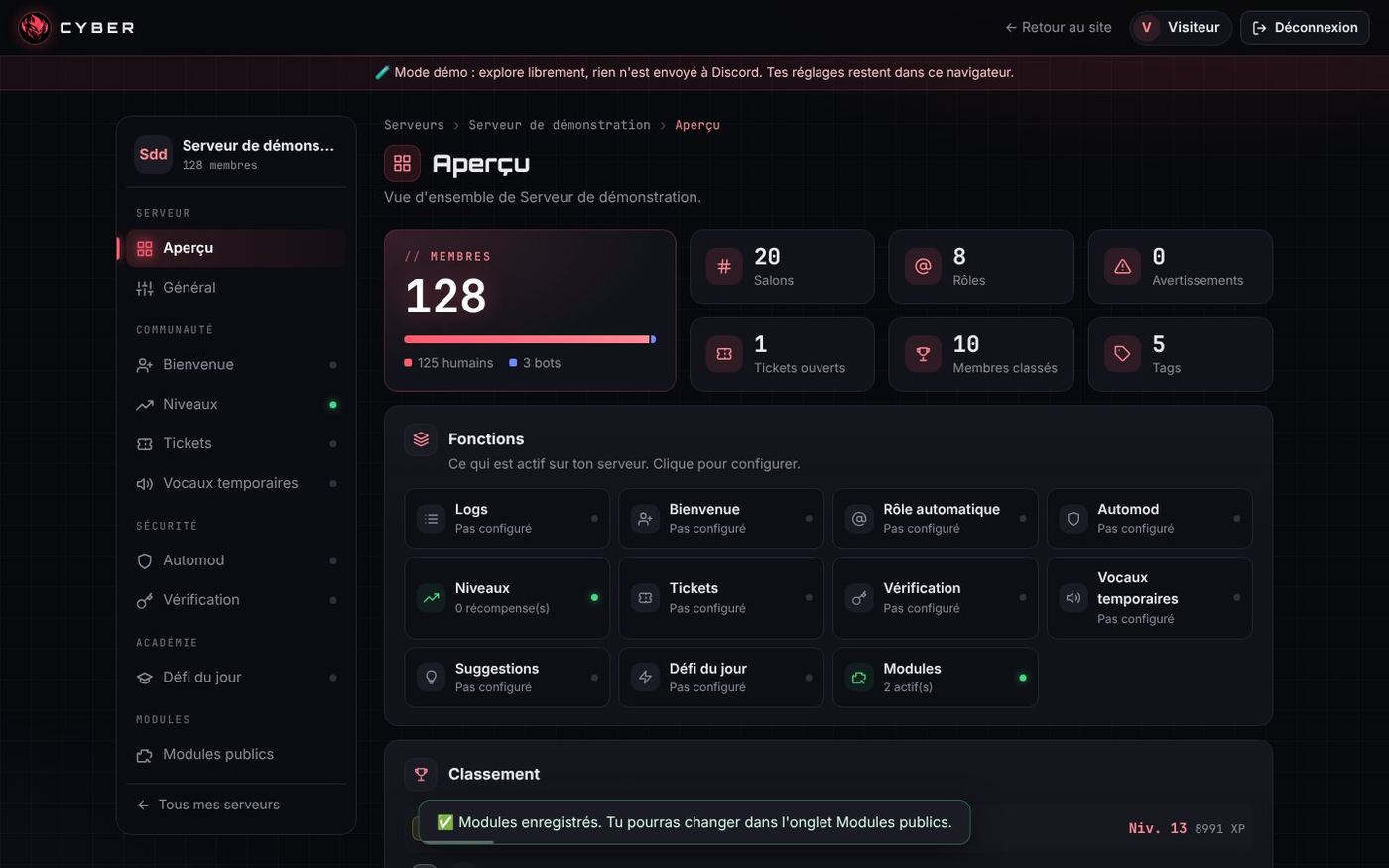
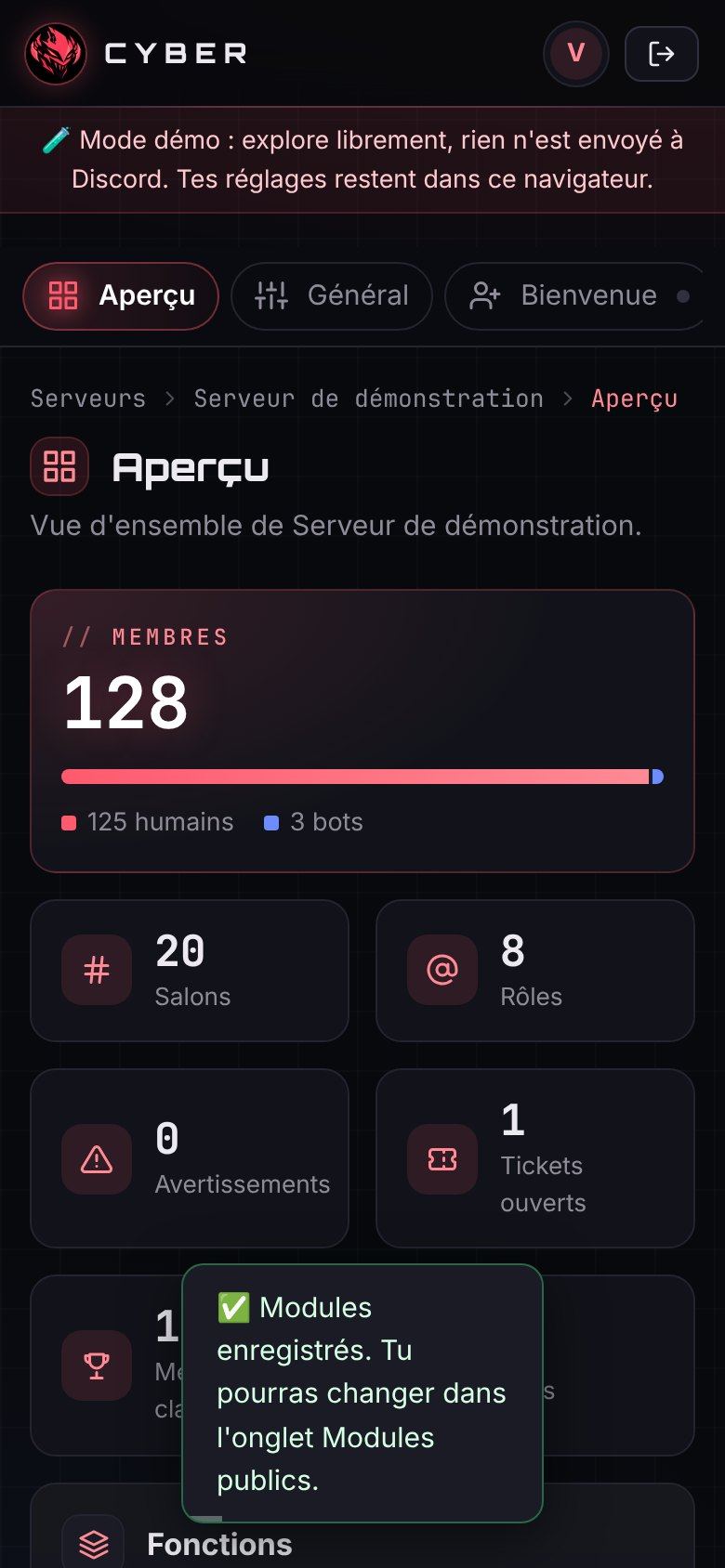
- full-height sidebar, arranged in groups (Server, Community, Security, Academy, Modules), with icons and a green dot on what is already configured;
- overview page with a large Members card and clickable modules;
- mobile version: the tabs become a scrolling bar;
- the redesign was first proposed on a branch of the website (pull request #1), tested in demo mode on computer and phone, then merged.
Step 3 · Panel v1.7: the 7 batches Enzo asked for
After going through every setting, Enzo listed what was missing. Everything was delivered in one evening, in 7 batches:
| Batch | Enzo's request | Result |
|---|---|---|
| 1 | Be able to switch tabs without saving, and a Reset button "like on Discord" | Tabs edit a draft. A fixed "Reset / Save changes" bar appears as soon as something changes. Leaving with unsaved changes makes the bar shake. Only the changed settings are sent. |
| 2 | Separate tickets and verification, create Community / Security / Public modules tabs | New navigation: Server, Community, Security, Academy, Public modules. |
| 3 | A library of banned words with their variants, and allowed words | About 250 words in categories (insults, hate, harassment, scams…) detected even when disguised (c0nn4rd, c.o.n.n.a.r.d), plus an allow list. |
| 4 | Hundreds of ready-to-use ticket templates | 123 templates in 12 categories (recruitment, complaint, partnership, shop, games, roleplay…), editable, with up to 5 questions asked on opening and a "Take charge" button. |
| 5 | Automated temporary voice channels | "Join to Create" system: creator channel installed in one click, default options, /vocal panel to rename, limit, lock, hide, set a status… |
| 6 | A daily challenge in an automatically created channel, played privately, with a top 5 or 10 | The channel is created on save. Each member answers with ephemeral messages (visible only to them). At the chosen time, the leaderboard is published and stays in the channel, then a new quiz starts. |
| 7 | All messages in "Embeds V2" format | Automatic conversion of every message to Components V2. |
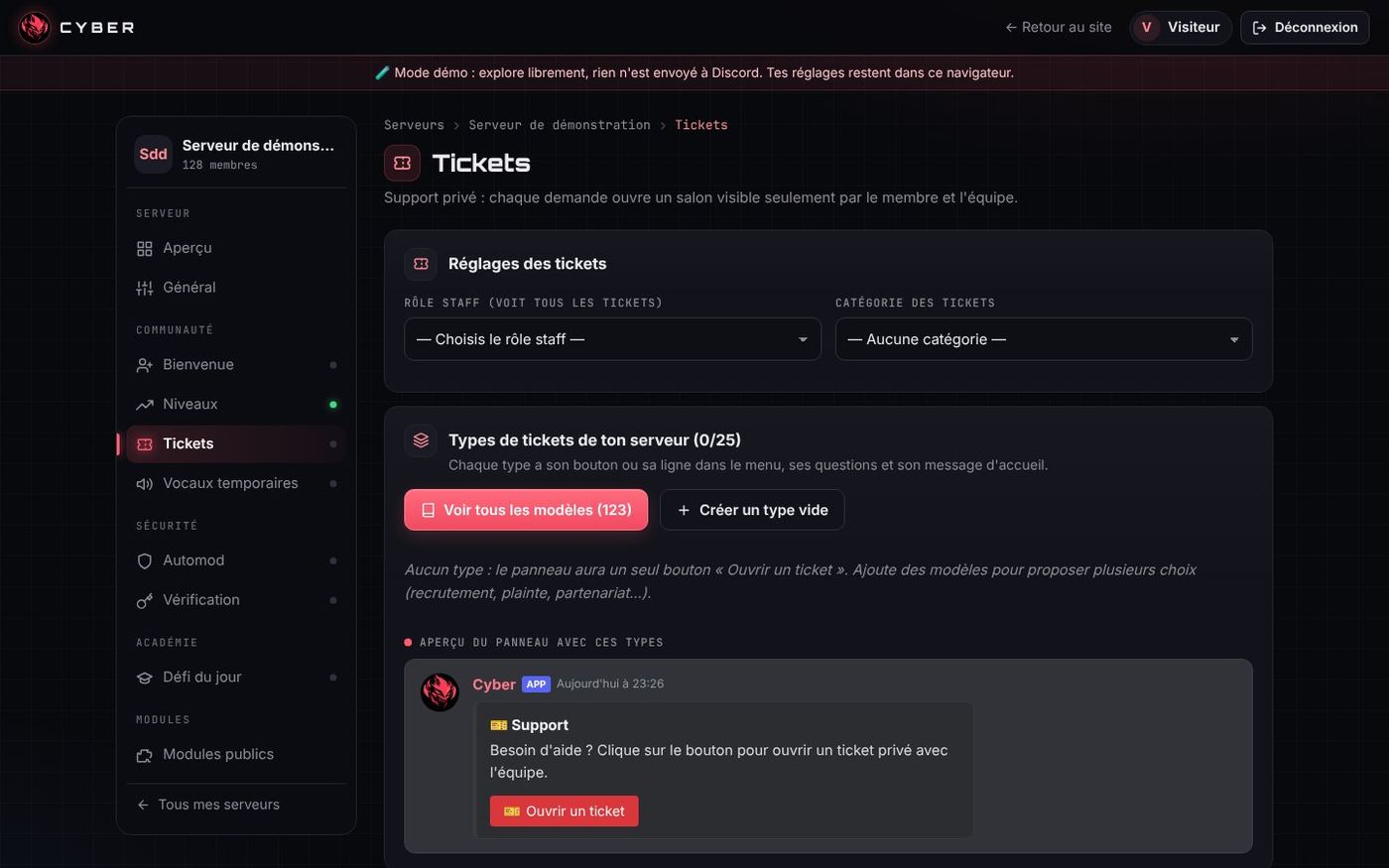
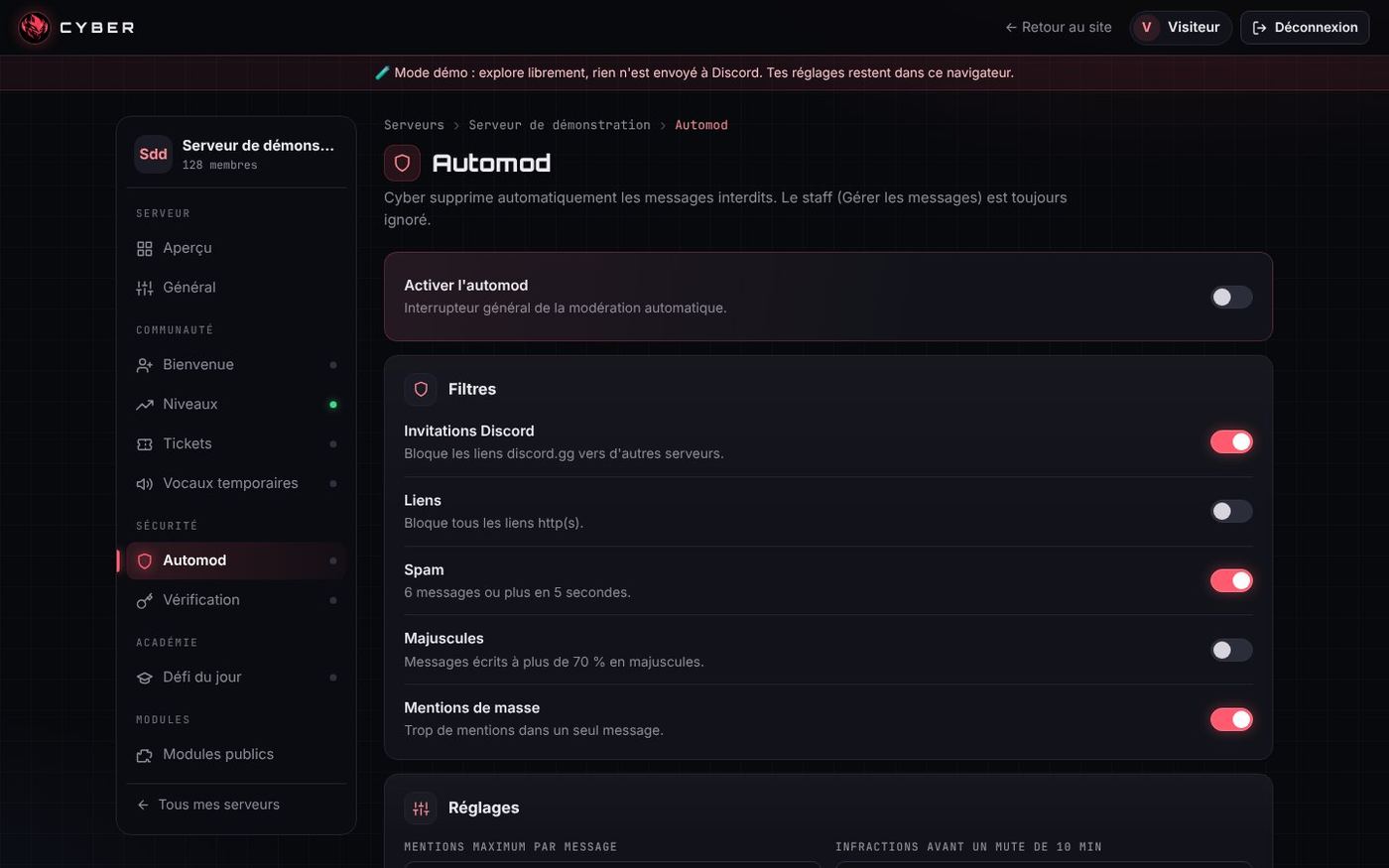
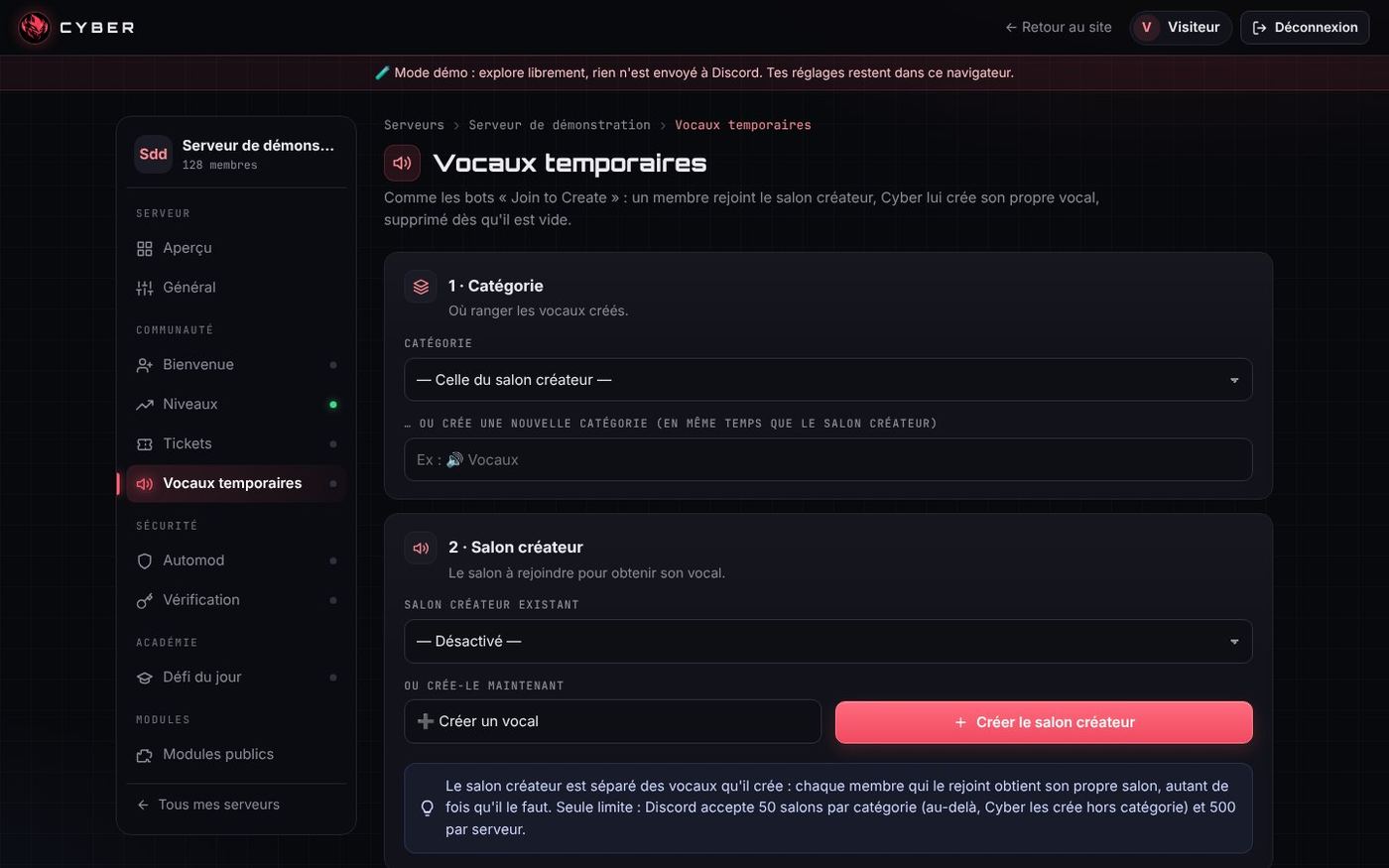
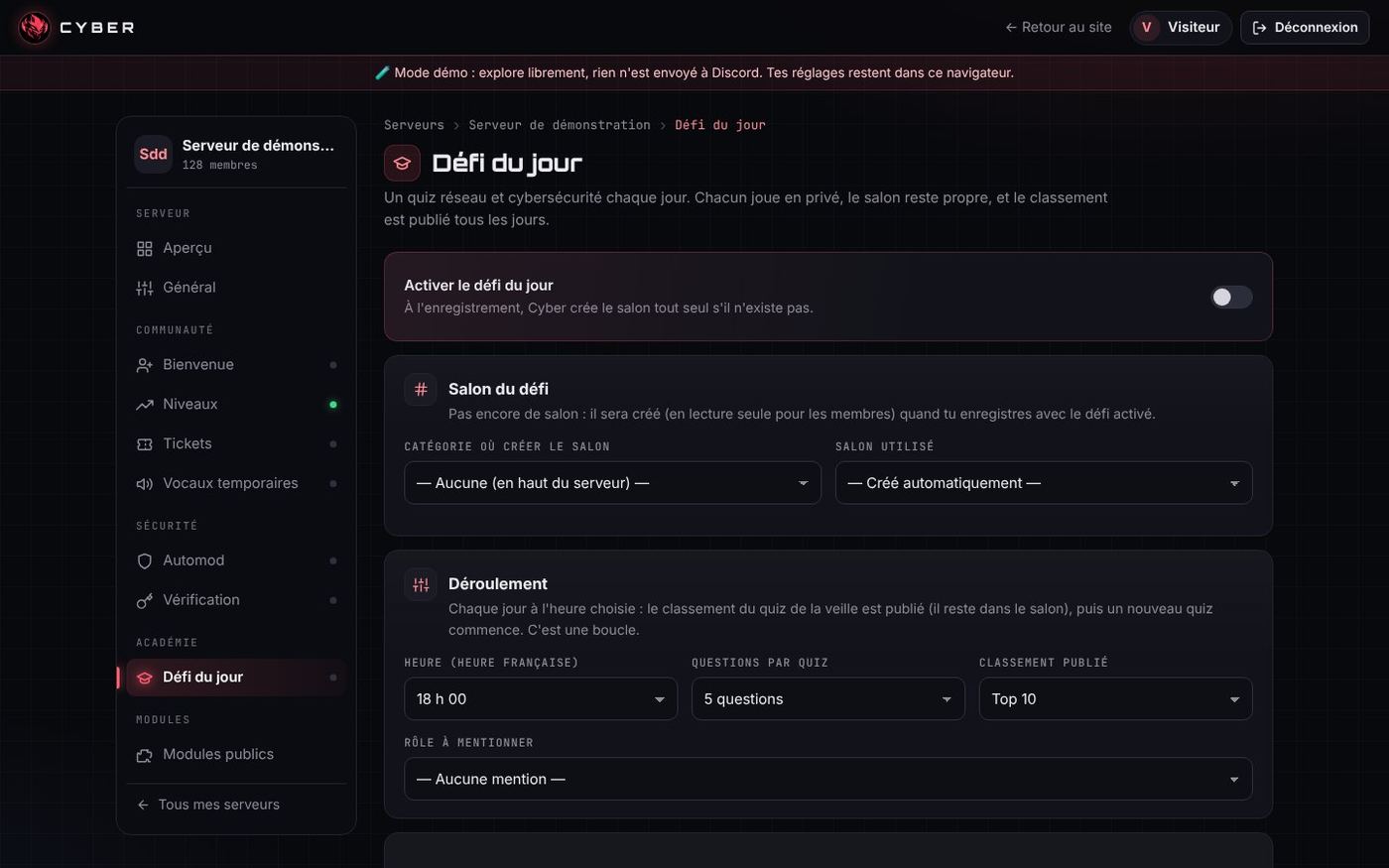
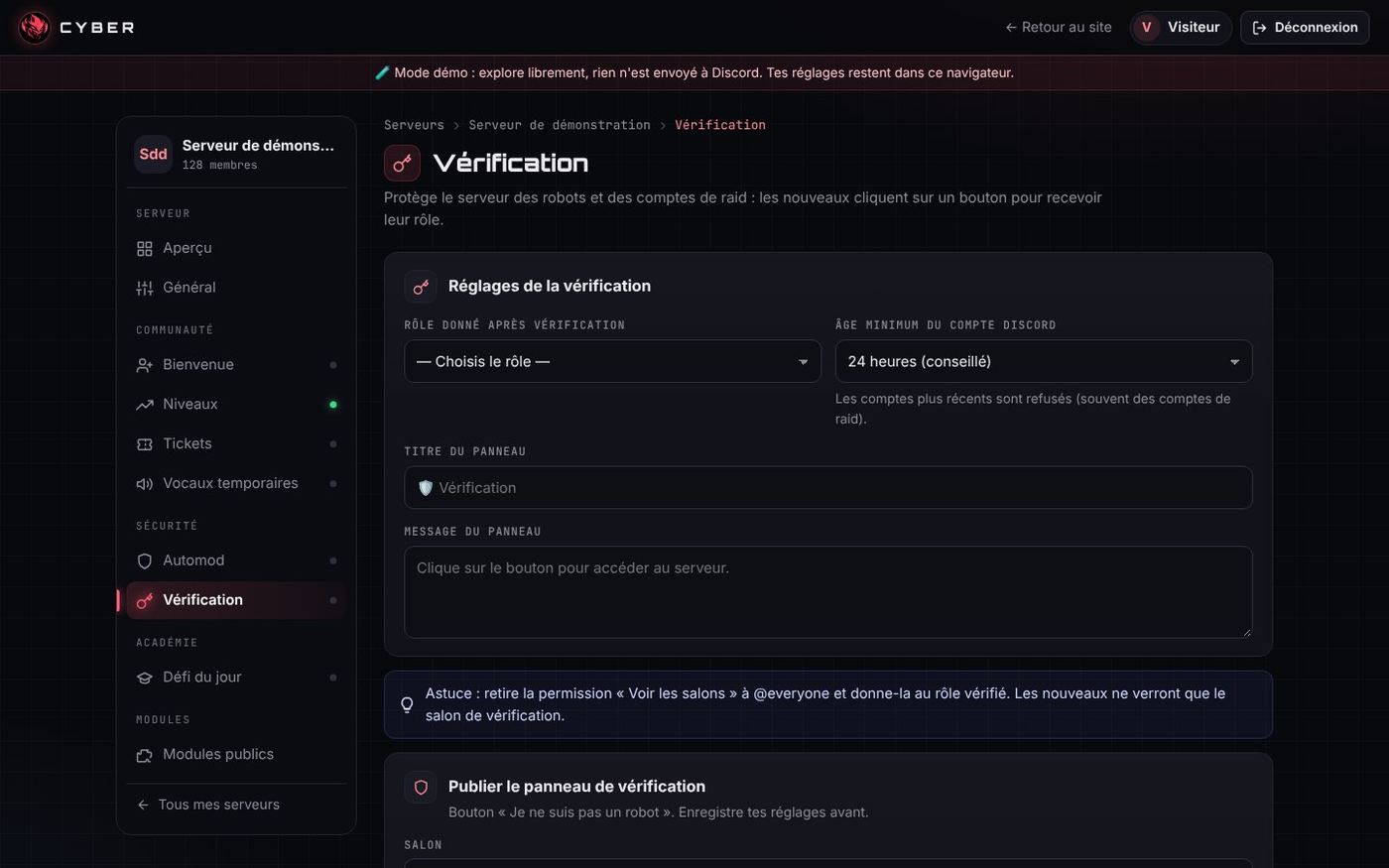
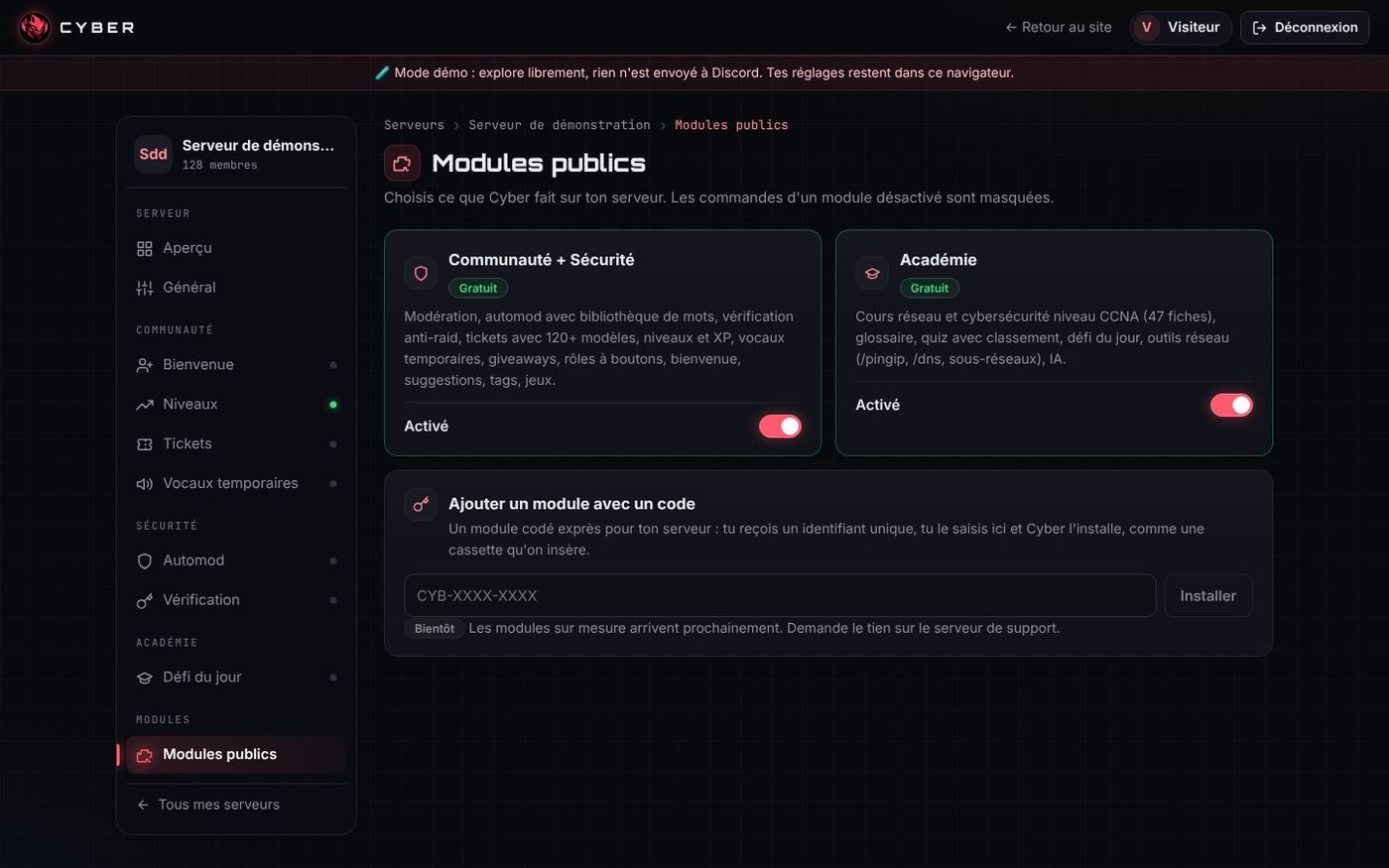
Step 4 · Verification and rules (night of 28 to 29 October)
- The Verification tab lets you choose or create the "Unverified" and "Member" roles.
- Each new member automatically gets "Unverified", without relying on the auto-role. The rules button gives them "Member" and removes "Unverified".
- A rules editor offers 17 ready-to-use templates (the first is the support server's), with preview and one-click publishing.
- Option to hide all other channels from unverified members.
Step 5 · The panel open to everyone (29 October)
Until then, Cloudflare Access only let me in. On 29 October, I want everyone to be able to configure Cyber, "without a security hole or weird token login".
- Check before opening (audit no. 5, chapter 8): a single hole found and fixed.
- End of the "weird login": the old preview panel at
cyberbot.fr/panel/put a Discord token in the address ("implicit" OAuth flow). It is replaced by a simple redirect topanel.cyberbot.fr, which uses the bot's real Discord login. - Cloudflare Access removed, along with the old redirect address in the Discord portal.
- Lasting sessions: they are saved in SQLite (only the Discord ID and username, the session key stored as a hash). A bot restart no longer logs anyone out, and the login lasts 7 days.
- Waiting page with a mini-game: if the panel takes more than a second to answer or my PC is off,
cyberbot.fr/panel/shows a small original game (the Cyber robot jumps over bugs) and retries every 15 seconds. - Final test: a friend logged in with his own account. "It works well!"
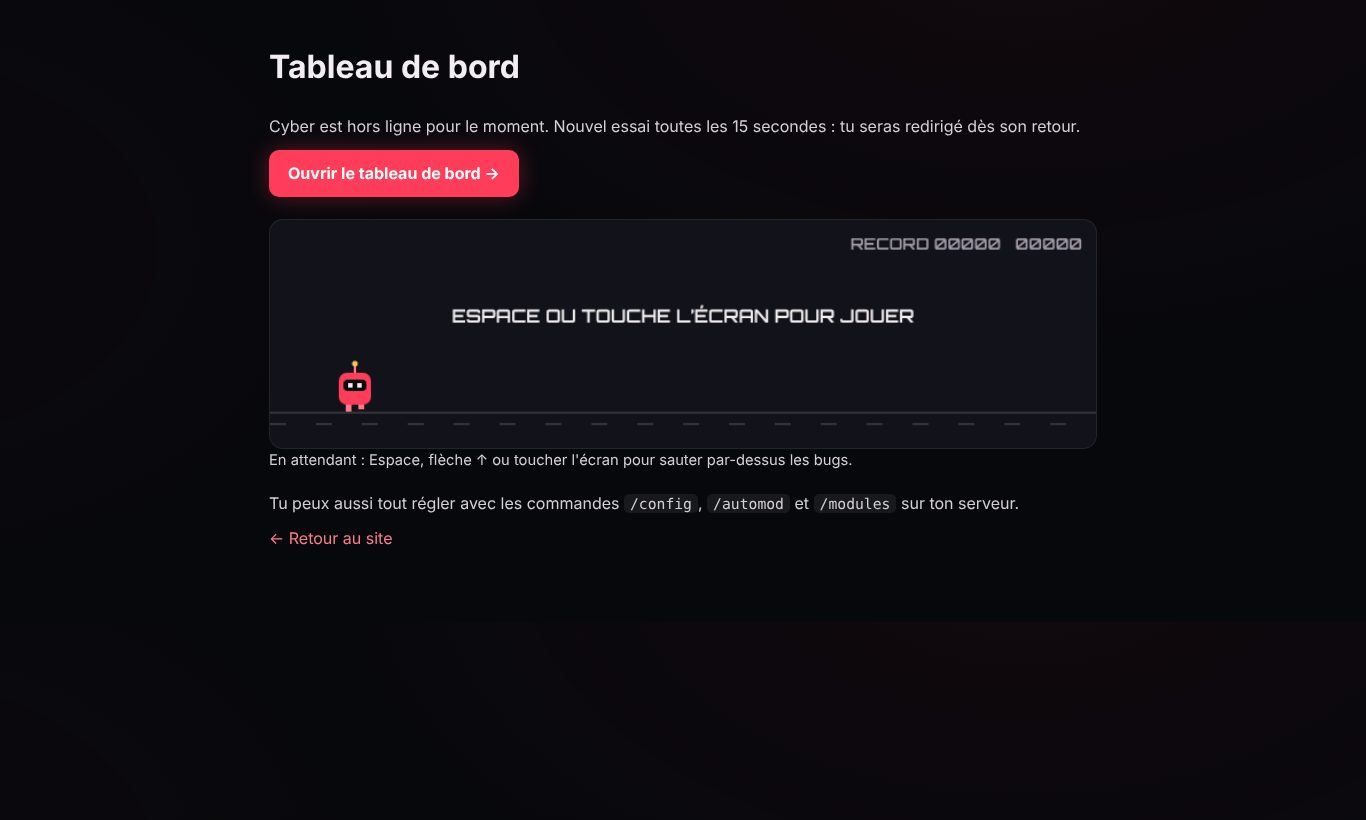
Step 6 · Panel v1.9: quicker to browse (30 October)
- Menu with sub-sections: the open tab shows its parts (for example Verification → Roles, Rules message, Channel and publishing) so you can jump straight to them.
- Modules at the top: Public modules, then each module (Academy) in its own drop-down menu, separate from the basic settings.
- Public modules in two parts: "Installed on this server" and "Find a module" (most installed, best rated, new, search by name or by ID, link to support). Each server can rate a module from 1 to 5 stars. The custom module code sits in a small button at the top.
- Choose a server: each card shows the members, online members, boosts, channels, language, modules and how long Cyber has been there.
- Overview: number of boosts and level, emojis.
- Language: French, English, or both with the list of English channels.
- Discohook-style advanced rules: several cards, each with its colour, and title, text, small text, separator or image blocks, with a live preview.
Panel security
The panel has no password and no SQL database: no SQL injection is possible. The protections in place:
- Discord OAuth2 login with a
stateparameter against CSRF attacks; HttpOnly,SameSite=Laxsession cookie, andSecureover HTTPS;- displayed text uses
textContentor is escaped (against XSS) and a CSP policyscript-src 'self'; - custom header and origin check on every request that changes something;
- "Manage Server" permission re-checked live on every request;
- rate limit per IP address (the real IP is read behind the Cloudflare tunnel);
- HSTS as soon as the panel is over HTTPS;
- the panel only listens on
127.0.0.1: it is never exposed over plain HTTP on the Internet.
Since 29 October, sessions are also stored as hashes and the log channel can only be changed by an administrator (audit no. 5). Details of tunnel access are in chapter 7.
↑ Back to topChapter 6
The website and the cyberbot.fr domain
The showcase website
The website presents Cyber, lists its commands, explains how to get started and publishes the version history. It is hosted for free by GitHub Pages, over HTTPS.
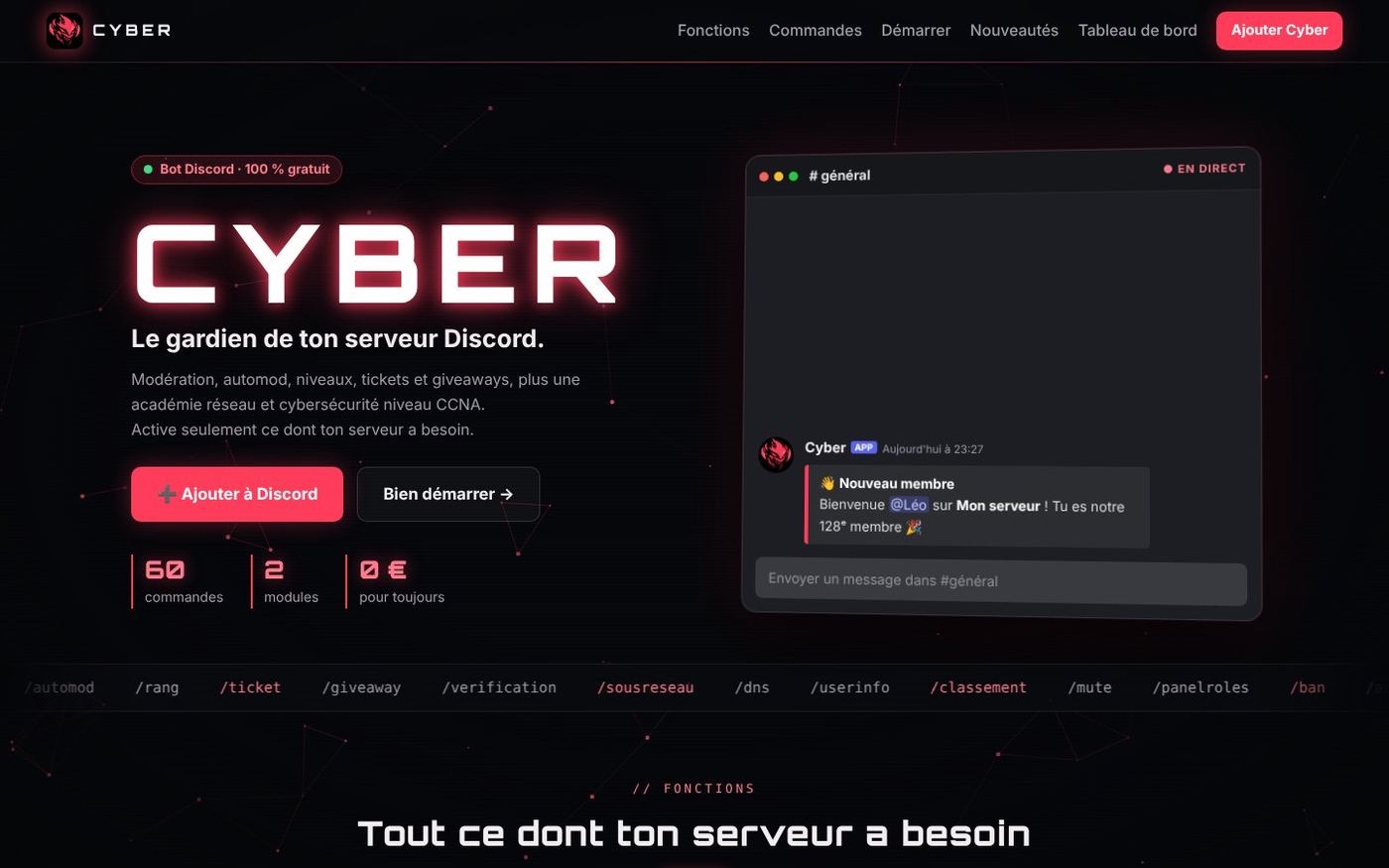
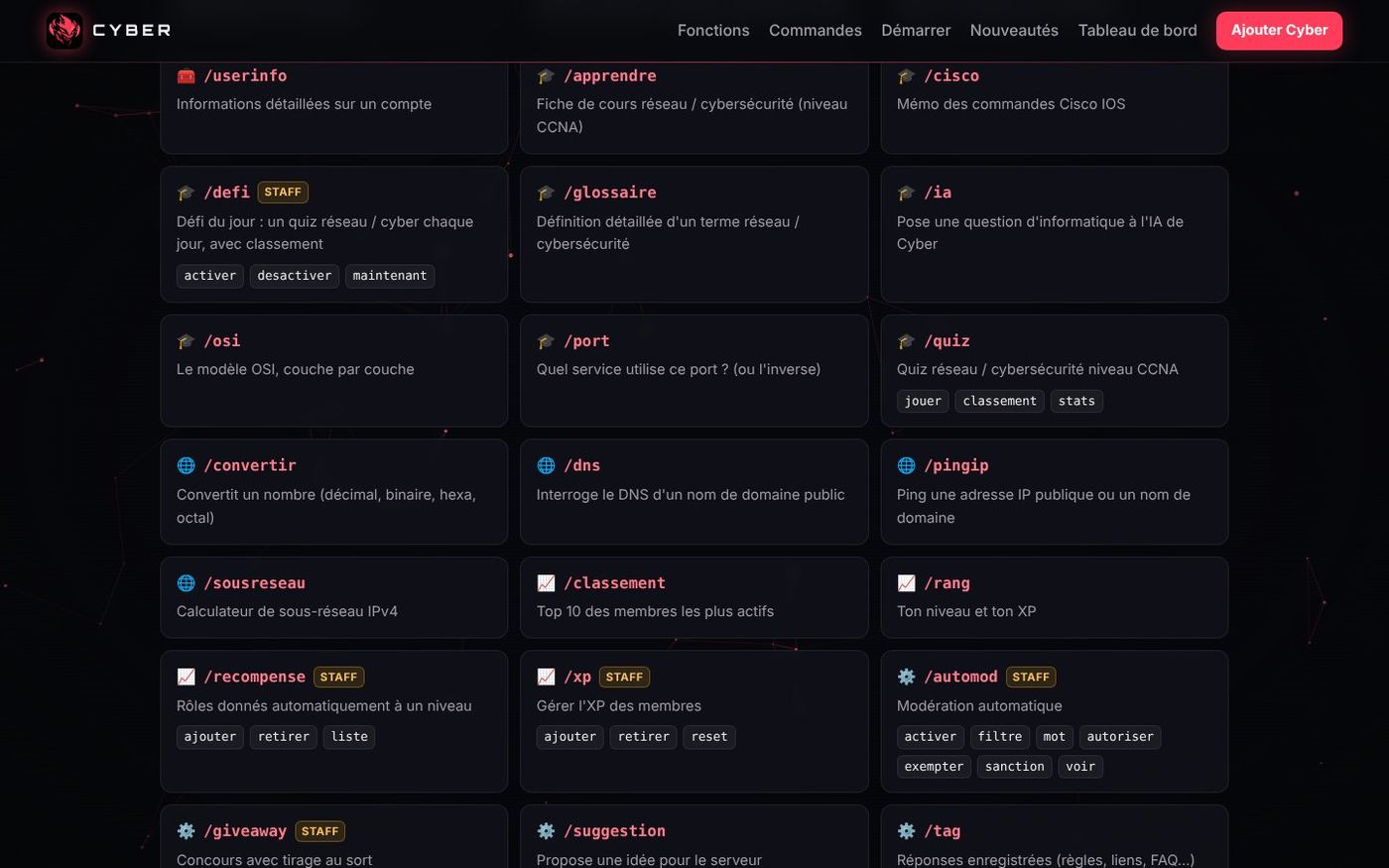
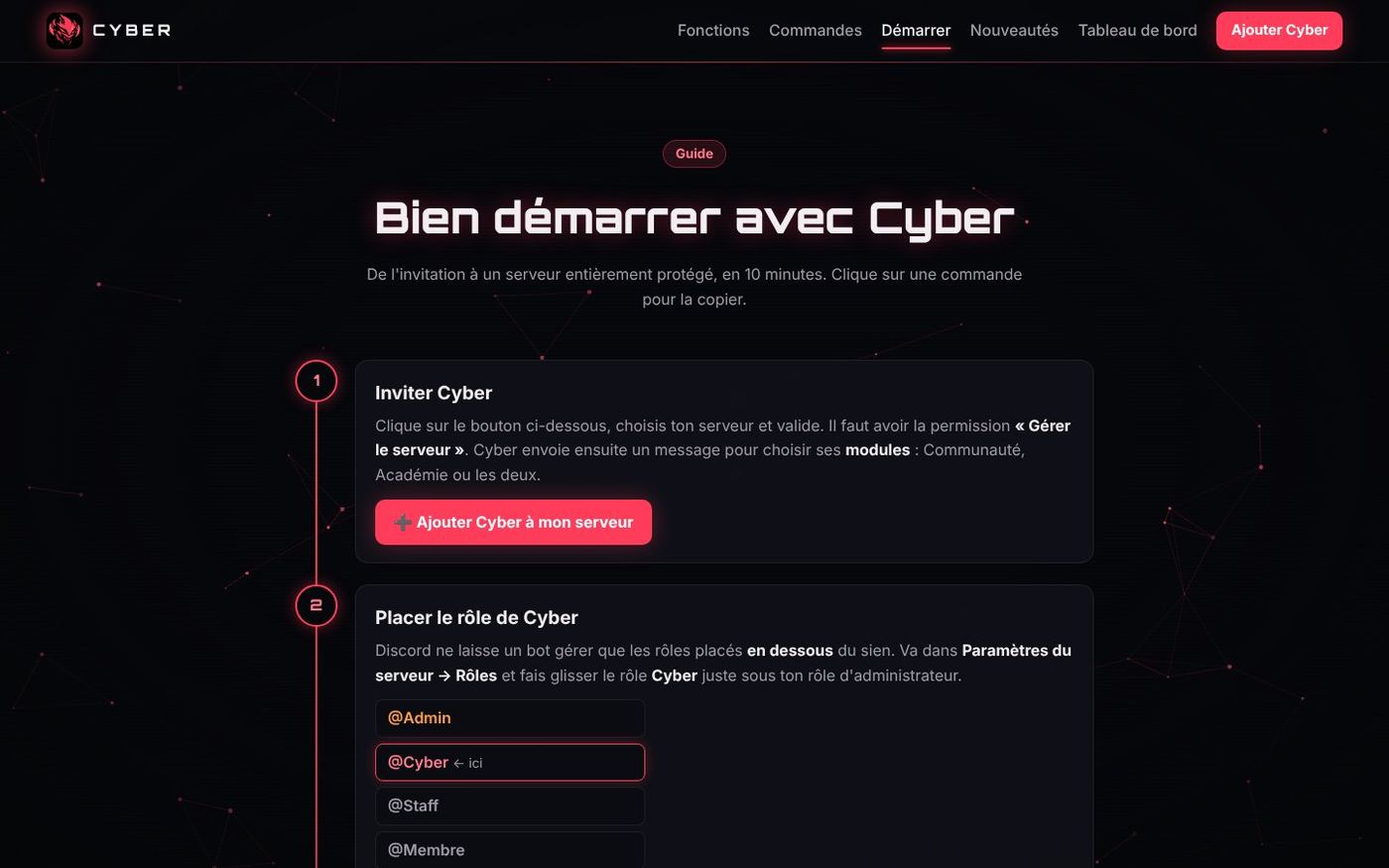
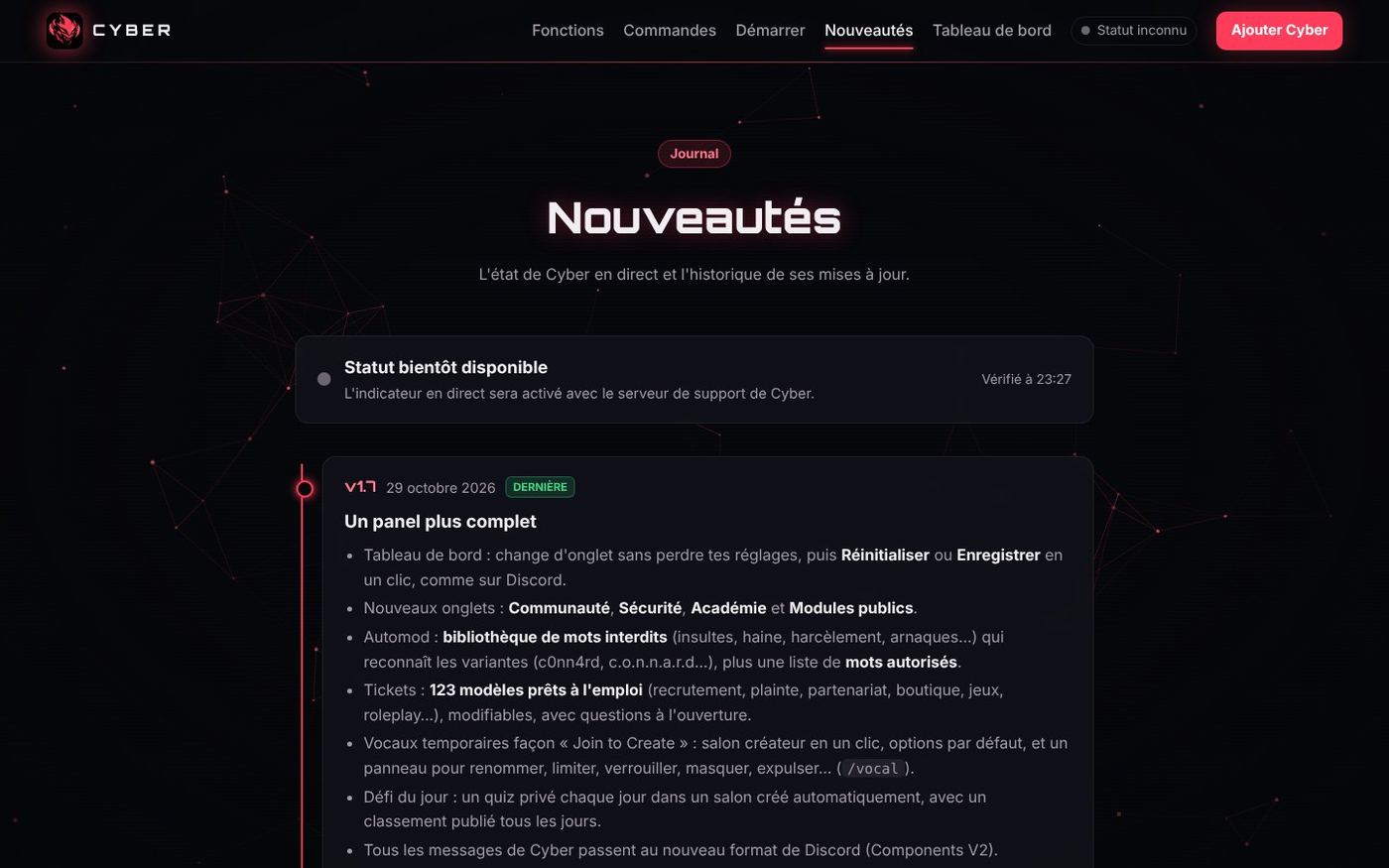
| Page | Content |
|---|---|
| Home | Presentation, features, searchable command list, FAQ |
| Getting started | Step-by-step guide after inviting the bot |
| What's new | Status and version history |
| Terms, Privacy, Legal notice | Legal pages (see chapter 9) |
| Panel | Redirect to the real panel panel.cyberbot.fr, with a waiting page and a mini-game if it doesn't answer (since 29 October; before that, a demo without an account) |
| English | English home page (29 October) |
| Custom modules | Presentation of the future "cartridges", announced as "Coming soon" |
| 404 | Error page in Cyber's colours |
How the website is built
- The pages are written in the bot's folder, under
outils/site/<page>.main.html. -
The
build.pyscript adds the header, the footer and "cache-busting" version numbers, then writes the pages into the website folder. It also rewrites theCNAMEfile. Since 1 November, it writes clean addresses, without ".html":cyberbot.fr/demarrerinstead ofcyberbot.fr/demarrer.html, andcyberbot.fr/instead ofcyberbot.fr/index.html. GitHub Pages finds thedemarrer.htmlfile on its own, and a small script removes the ".html" from the address bar if someone types the old address (so old links still work). -
commandes.jsis generated from the bot's code: the website's list is therefore always up to date. PUBLIER.batsends everything to GitHub. The website is live 1 to 2 minutes later.
The fonts (Orbitron, Inter) are hosted on the website itself so that nothing is sent to Google.
The 10 improvements of 29 October
When I asked "what could we change on the website?", Claude suggested 10 ideas ranked by priority. I answered "all of them":
- Custom 404 page, instead of GitHub's grey page.
- robots.txt and sitemap.xml so that Google finds every page, documentation included.
- WebP images: the logo, shown at 38 pixels, weighed 207 KB. It is now about 26 times lighter.
- Link previews when shared on Discord or X, with a dedicated image.
- "Cyber in pictures" section with screenshots of the panel.
- 3 more FAQ questions: free? permissions? data?
- Live counter of support server members.
- "Docs" link to this documentation in the menu.
- English home page, updated that same evening when the bot became bilingual.
- "Custom modules" page with a "Request a module" button.
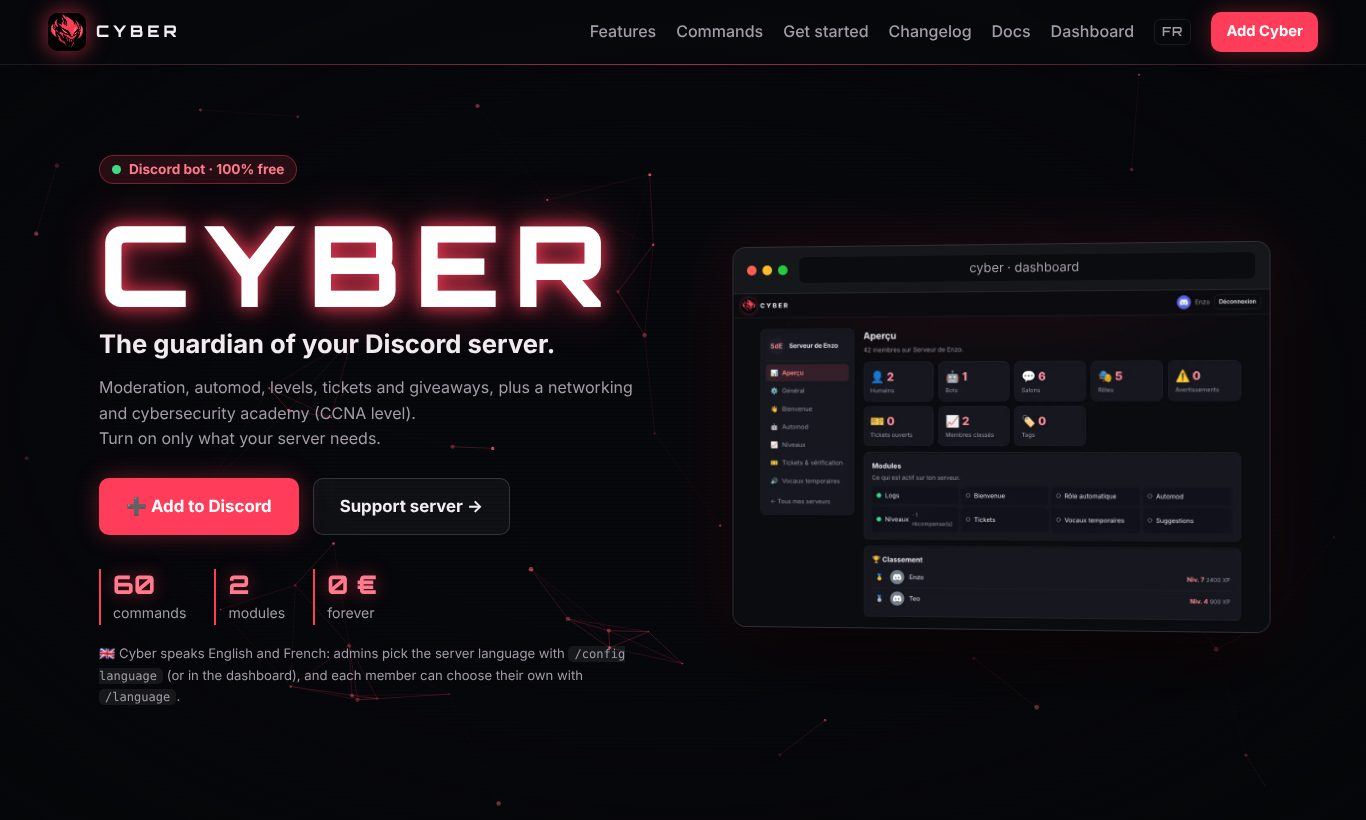
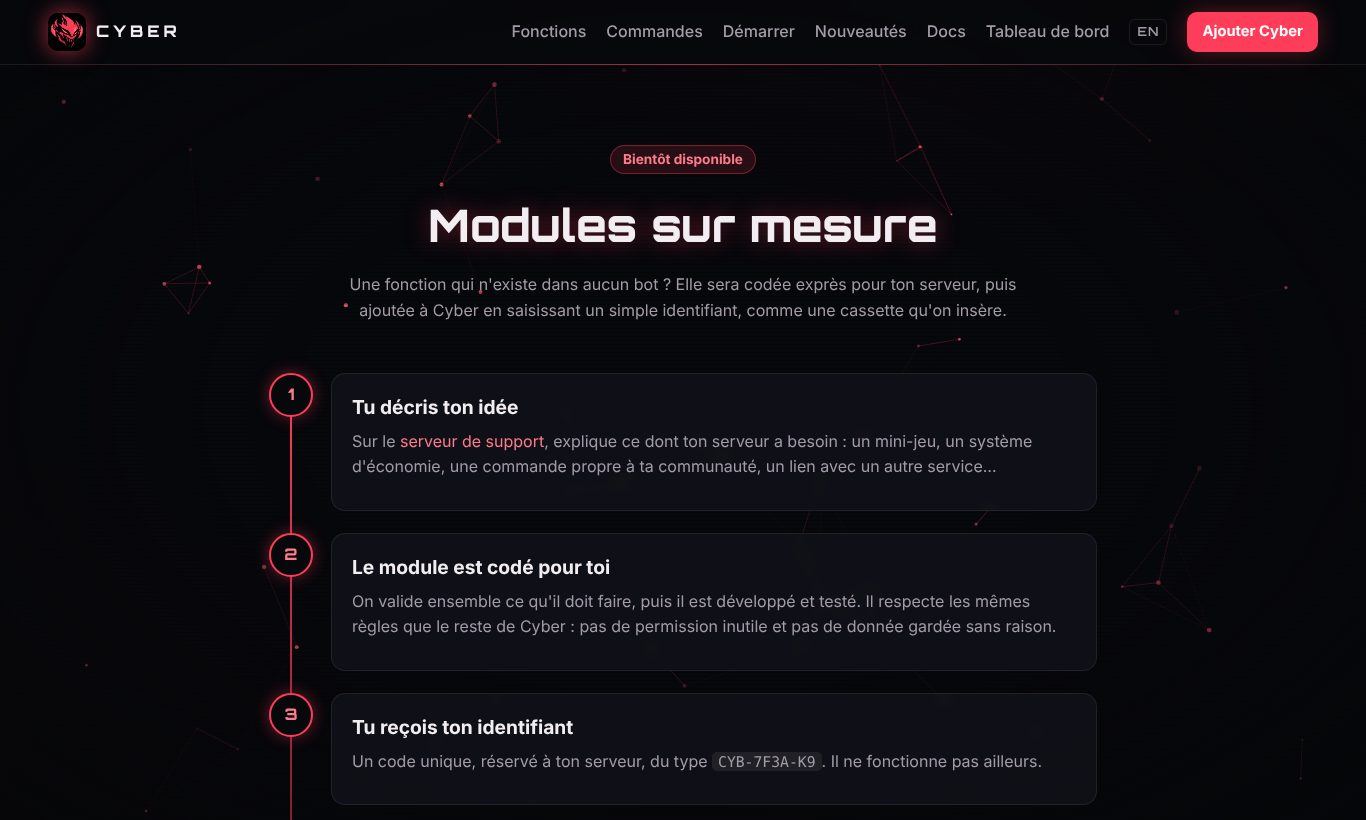
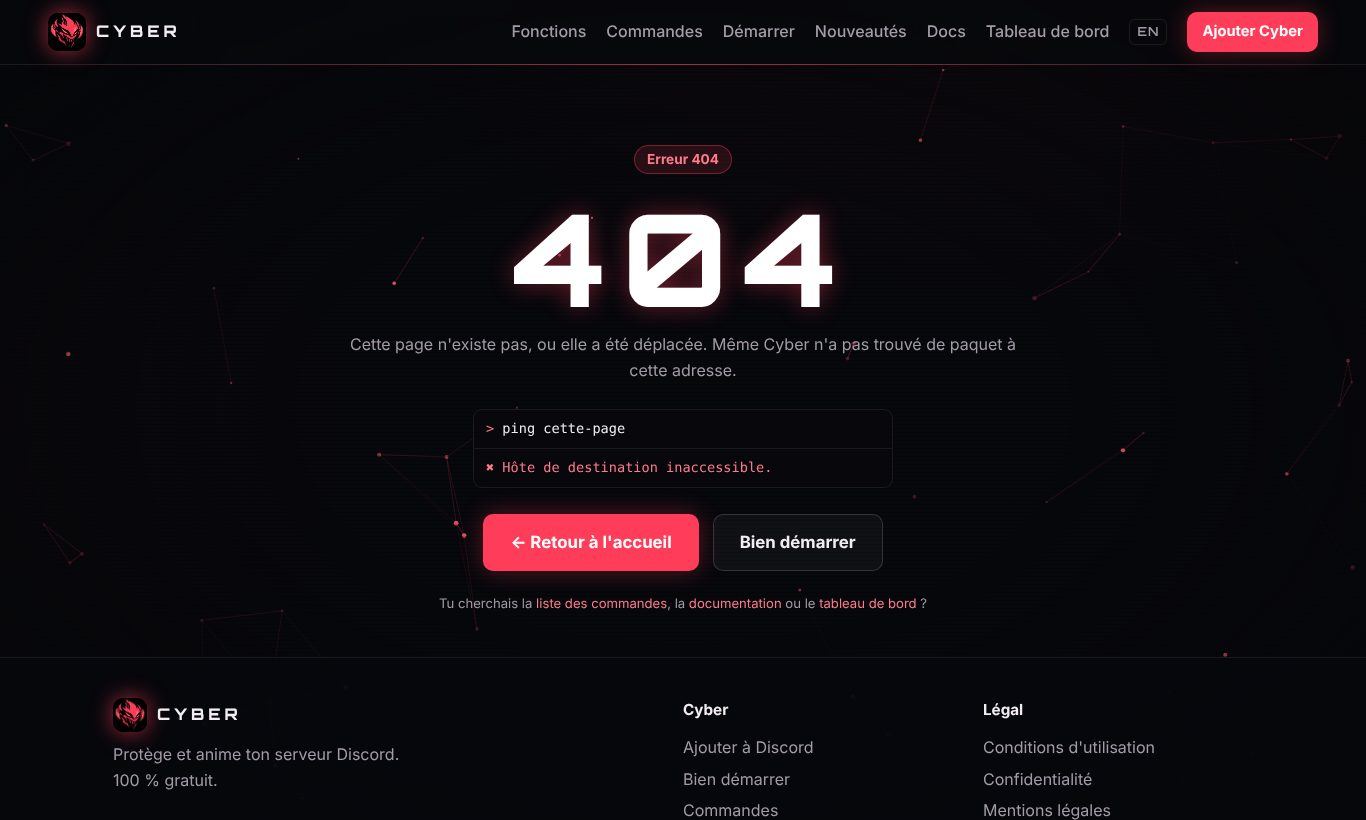
The same day, the old demo panel gave way to a redirect to the real panel (chapter 5).
Buying the domain name (28 October)
As cyber.com or cyberbot.com were almost certainly taken or very expensive, the choice went to cyberbot.fr:
- bought from OVH for about €6 the first year;
- without paid options (no email, no Anycast DNS);
- DNSSEC removed on purchase to avoid an outage when moving the DNS to Cloudflare (it can be re-enabled on the Cloudflare side);
- automatic renewal enabled;
- for an individual, the
.frhides the name and address in the public directory (Whois).
Moving the DNS to Cloudflare
- Domain added to Cloudflare (Free plan), with blocking of AI training bots enabled.
- At OVH: "Use my own DNS", with the two name servers provided by Cloudflare.
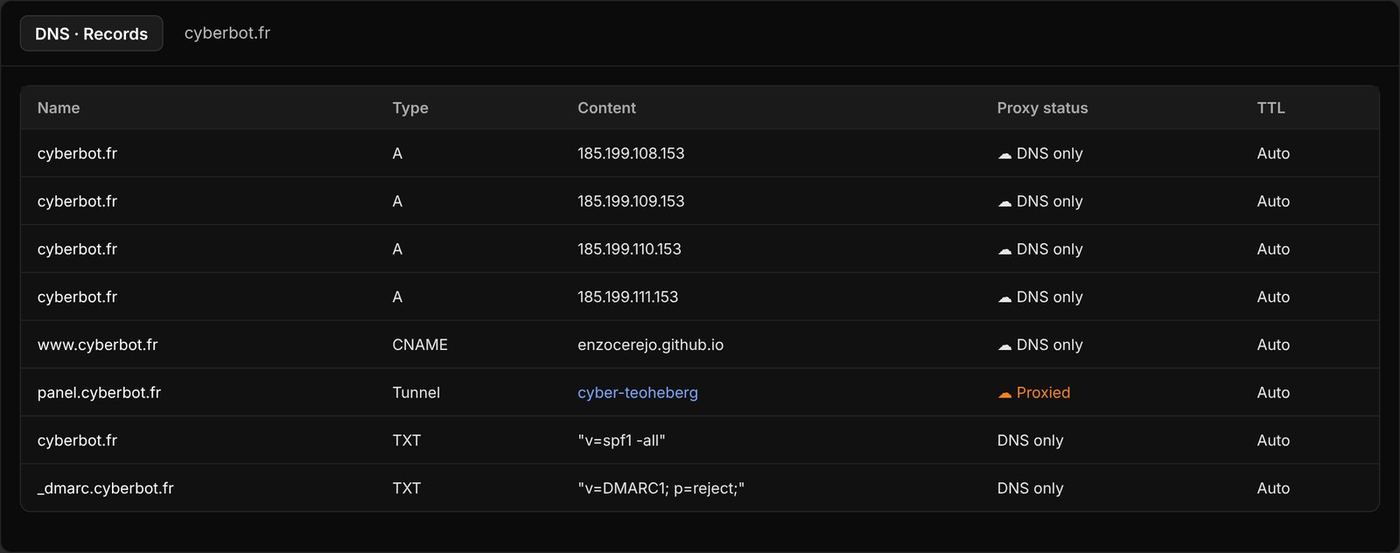
- Two anti-spoofing records added, since no email is sent from
@cyberbot.fr:TXT @ "v=spf1 -all": no server is allowed to send mail for this domain;TXT _dmarc "v=DMARC1; p=reject;": fake mails must be rejected.
- Domain active in under an hour.
The website moves from github.io to cyberbot.fr
- Four A records pointing to the GitHub Pages servers and a
wwwCNAME pointing toenzocerejo.github.io, all DNS only (grey cloud): otherwise GitHub cannot create the HTTPS certificate. - Domain verification in GitHub (
TXT _github-pages-challenge-…record). - Custom domain added to the repository, then Enforce HTTPS ticked once the certificate was created.
- On the code side:
CNAMEfile added and protected (rewritten on every build), every link replaced,PUBLIER.batimproved to first fetch the changes made online before sending.
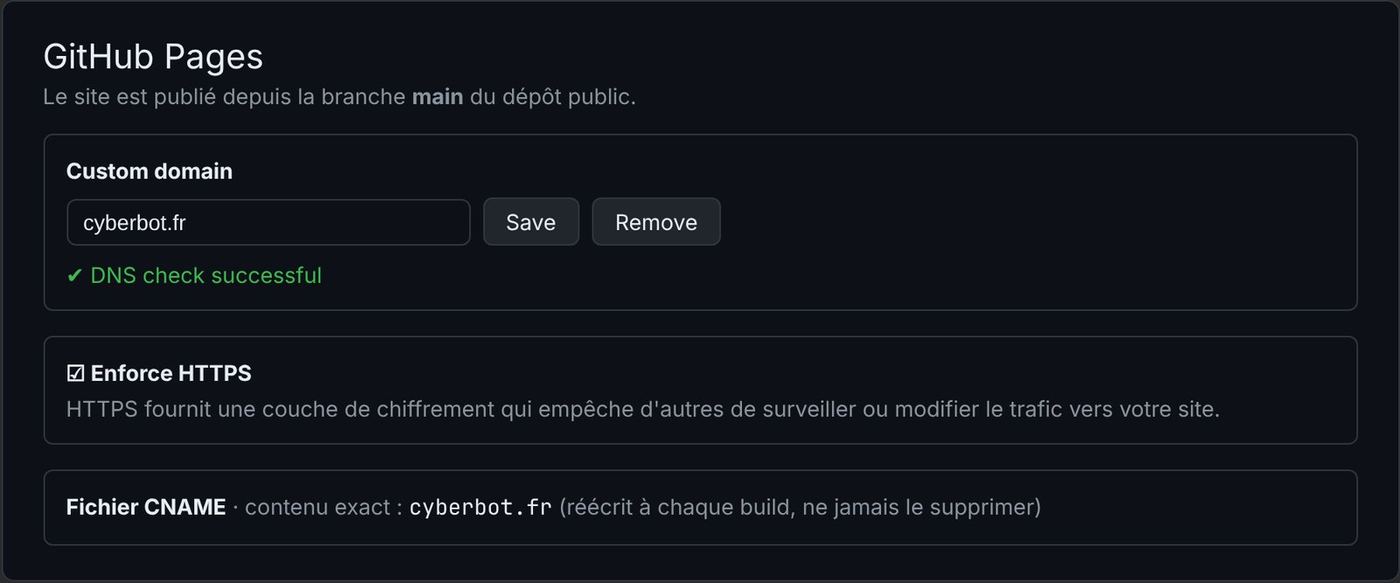
Protecting the main branch
A GitHub ruleset protects the website's main branch: deletion forbidden and "force push" blocked. Pull requests are not mandatory, so that PUBLIER.bat can keep publishing directly.
The website's pull requests
| PR | Content |
|---|---|
| #1 | New "Cyber console" interface for the demo panel |
| #2 | Rewritten legal pages, legal notice, /mesdonnees in the command list |
| #3 | This documentation |
Chapter 7
Hosting, private GitHub and Cloudflare tunnel
This chapter tells the most "networking" part of the project: running the bot 24/7, then making its panel reachable over HTTPS without opening a single port.
Step 1 · A temporary host (26 October)
While waiting for a personal machine, the bot is installed at Teoheberg, a free credit-based host built on Pterodactyl (each server is a Docker container).
Changes made in the code:
- an
index.jsfile at the root that startssrc/index.js(the host's panel runsindex.js); - automatic detection of Pterodactyl: the panel listens on the assigned port and commands are registered at start-up (there is no
DEMARRER.batover there); - Node 25 compatibility checked; nothing changes on the PC.
An important rule found along the way: never run the bot on the PC and on the host at the same time, otherwise every command gets two answers.
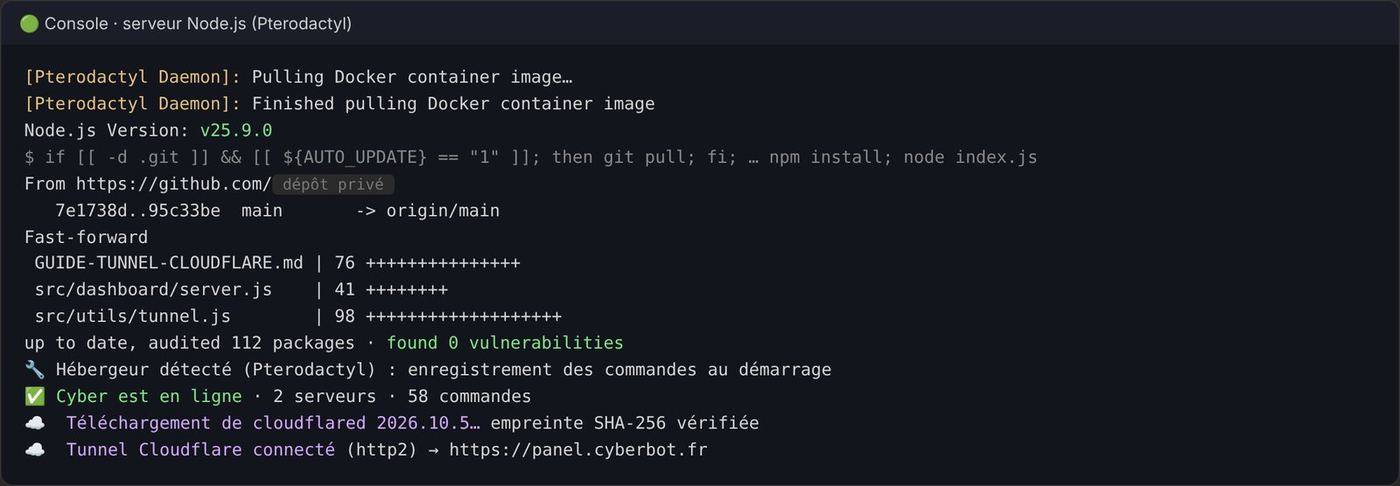
Step 2 · Updates through a private GitHub repository
Instead of sending a zip after every change:
- Enzo creates a private repository on GitHub.
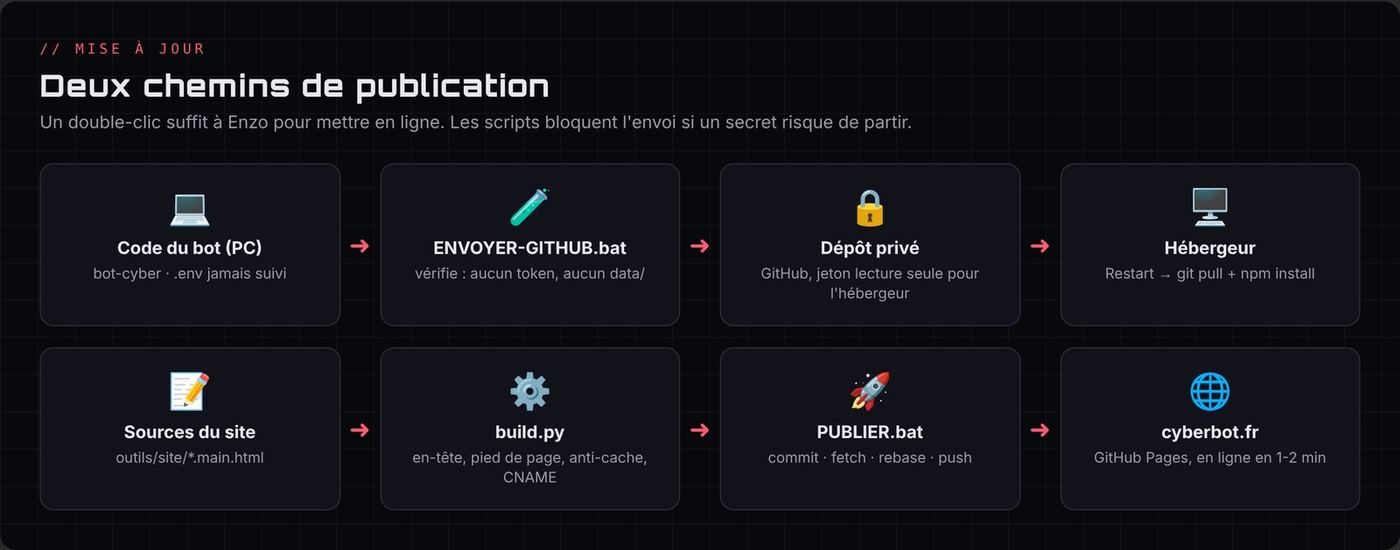
ENVOYER-GITHUB.batsends the code, refusing to go if a secret or thedata/folder might be included. The.gitignoreexcludes.env,data/,node_modules/and zips.- The host reads the repository with a read-only "fine-grained" GitHub token, limited to that one repository.
- With the "auto update" option, a simple Restart runs
git pull,npm installand restarts the bot.
The .env (bot token, secrets) is never on GitHub: it is created by hand in the host's file manager.
Step 3 · The unreachable panel
The bot was working, but the panel's address gave ERR_CONNECTION_TIMED_OUT. Diagnosis in two steps:
- The host's name went through Cloudflare, which only relays the usual web ports (80, 443…), not the assigned port.
- Support then confirmed that the machine had no open inbound port.
The bot itself worked because it is the one connecting to Discord (outbound connection). That idea gives the solution.
Step 4 · The Cloudflare tunnel
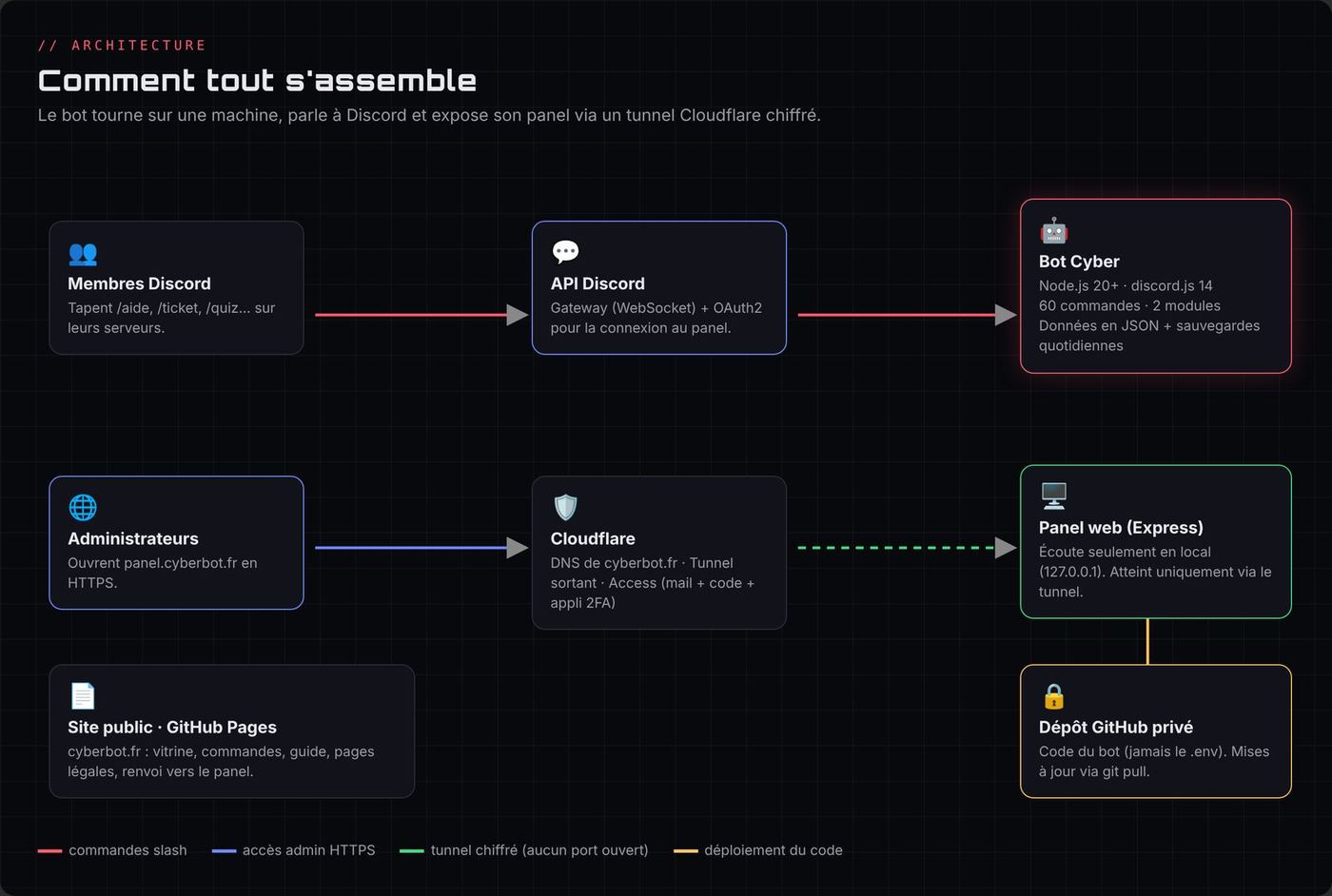
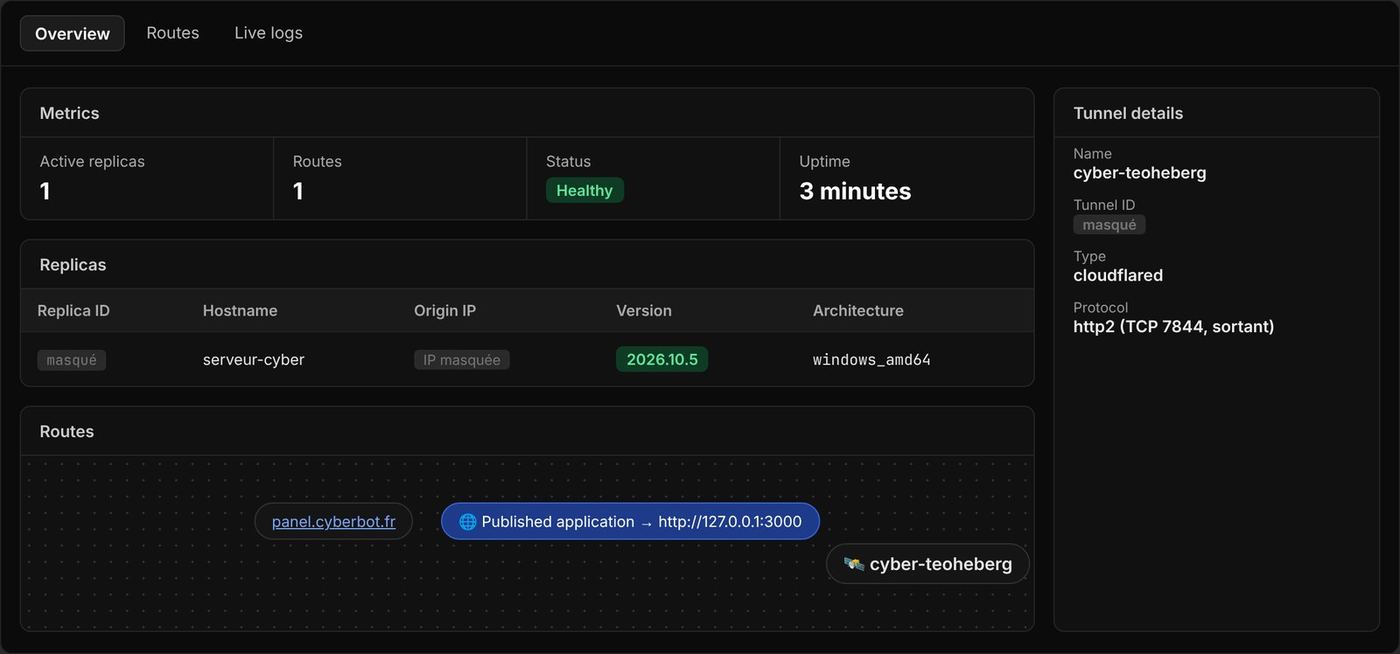
A Cloudflare tunnel reverses the direction of the connection: the server calls Cloudflare, and Cloudflare then sends visitors of panel.cyberbot.fr to it. Result: HTTPS, hidden IP address, and no port to open.
What was coded (src/utils/tunnel.js):
- if
TUNNEL_TOKENis present in the.env, the bot downloads the officialcloudflaredprogram and starts it; - connection over
http2on outbound TCP port 7844; cloudflaredgets a minimal environment: it cannot see the Discord token;- it is restarted automatically if it goes down;
- its SHA-256 fingerprint is recorded on first download and checked at every start (and can be pinned to the official value published by Cloudflare);
- the panel then only listens on
127.0.0.1.
On the Cloudflare side: creation of the cyber-teoheberg tunnel, then a public route panel.cyberbot.fr to the panel's local service.
Two traps met and solved
- Wrong fingerprint: the PC's
.envcontained the fingerprint of the Linux version ofcloudflaredwhile the PC downloads the Windows version. Security blocked the start, exactly as planned. Setting the official fingerprint of the Windows version was enough. localhostto IPv6: on Windows,localhostwas translated to::1(IPv6) while the panel only listens on IPv4. The route was fixed tohttp://127.0.0.1:3000, and the "Bad gateway" error disappeared.
Step 5 · Cloudflare Access: a lock in front of the panel
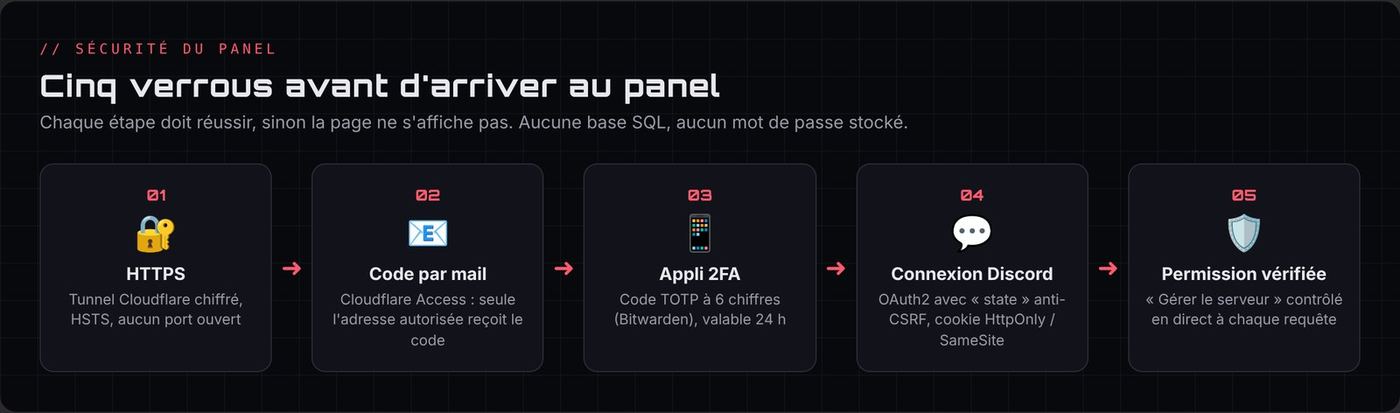
Even over HTTPS, a public address can be visited by anyone. Cloudflare Access (free) adds a check before the panel is even shown:
- "Panel Cyber" application on
panel.cyberbot.fr, 24-hour session; - "Me" rule: Allow only for Enzo's email address;
- One-time PIN login method only (code received by email), with "instant authentication";
- MFA: a 6-digit TOTP code from an authenticator app (Bitwarden), on top of the email code;
- custom team name for the login page.
Cloudflare answers the same way whether the address typed is allowed or not: nobody can guess which one is on the list.
29 October: this lock did its job during the test phase. So that everyone can configure Cyber, the Access application was deleted after an audit of the panel (chapter 8, audit no. 5). Security now relies on the panel's Discord login and on the "Manage Server" permission, re-checked on every request. The application can be recreated in two minutes if needed.
Step 6 · The tunnel from the PC
After the host deleted the server (see chapter 11), the same tunnel was restarted from Enzo's PC, simply by changing the route to 127.0.0.1:3000. The panel is available at https://panel.cyberbot.fr as long as the PC and the bot are on. For a future server, it will be enough to copy the .env with the right fingerprint and point the route to 127.0.0.1:<port>.
Future hosting: a "homelab" mini PC
Comparison made for hosting at home:
| Criterion | Raspberry Pi 5 (8 GB) | Refurbished mini PC (1 litre format) |
|---|---|---|
| Price seen late 2026 | ≈ €230 as a kit | ≈ €150-220 second-hand, ≈ €300-350 professionally refurbished |
| Processor | ARM | x86 (8th/9th gen i5) |
| Storage | microSD or SSD with an extra board | NVMe SSD included |
| Virtualisation | Very limited | Proxmox, several VMs (pfSense, Windows Server, labs) |
| Docker compatibility | Most images | All |
Conclusion: a refurbished mini PC (HP EliteDesk 800 G4/G5 Mini, Lenovo ThinkCentre M720q/M920q, Dell OptiPlex 7070 Micro) with Proxmox or Debian, Docker and the Cloudflare tunnel already set up. It will also serve as a lab for the BTS CIEL and the CCNA. Final choice (29 October): a second-hand HP EliteDesk 800 G5 Mini (6-core i5-9500, 16 GB RAM, 500 GB SSD, Wi-Fi) for €220, preferred to a €200 model that only had 12 GB. My father buys it on Saturday 31 October with leboncoin's secure payment. Planned next: Proxmox, a Debian VM with Docker for the bot, the panel and the tunnel, then lab VMs (pfSense, Windows Server, Linux) turned on only for revision.
And in the meantime?
On 29 October, I also looked at paid hosting so that the panel stays available even when my PC is off:
| Option | Price | Opinion |
|---|---|---|
| Hetzner Cloud CX23 (2 vCPU, 4 GB) | ≈ €4/month, billed by the hour | Recommended: reliable, no commitment, bots and tunnels allowed |
| Oracle Cloud "Always Free" | Free | Offer reduced in 2026, bank card, server stopped without warning if it does little work |
| OVHcloud VPS-1 | ≈ €7.79/month | More comfortable but more expensive for 2 or 3 months |
| "Free bot-only" hosts | "Free" | Ruled out: that's the kind that deleted my server |
Decision: stay on the PC for now (the panel is available when it's on) and decide in a few days. The tunnel won't change: it will just need to be started from the new machine.
↑ Back to topChapter 8
Security and audits
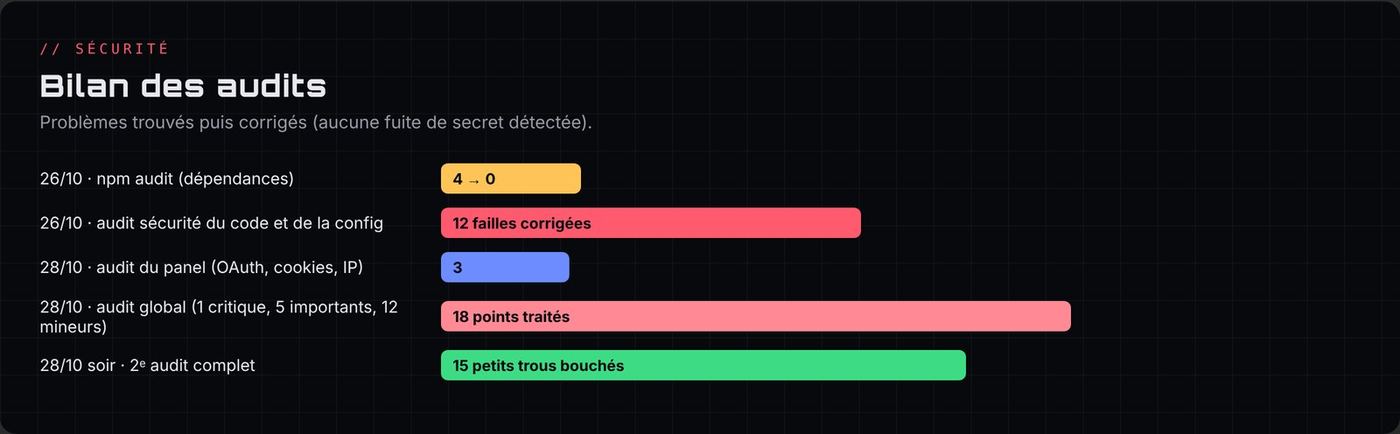
Security was treated as a common thread: five audits in four days, each time with a report ranked by priority, a simple explanation of each flaw, then tested fixes.
The basic rules
- The
.envnever leaves the machine: it contains the bot token, the OAuth2 secret, the tunnel token and the API key. It is excluded by.gitignoreand the upload scripts block anything that looks like a secret. - Private bot repository, public website repository but without any secret.
- Least privilege everywhere: invite without "Administrator", read-only GitHub token on a single repository, panel limited to
127.0.0.1,cloudflaredstarted without access to the Discord token. - No personal contact on the website: contact goes through the Discord support server.
Audit no. 1 · Code and configuration security (26 October)
Starting point: npm audit reported 4 vulnerabilities in Express. They were fixed (Express 4.22.3, 0 vulnerabilities), then all the code was reviewed. 12 flaws fixed:
| Flaw | Concrete risk | Fix |
|---|---|---|
| Vulnerable Express dependencies | A crafted request could crash the bot (denial of service) | Update, npm audit at 0 |
| Roles given automatically without checks (the most serious) | An Admin role placed in verification, auto-role, a reward or a role panel made any member an administrator | A role with moderation or admin permissions is never handed out automatically, and the person configuring it must be able to give it themselves |
| @everyone / @here mentions | Making Cyber ping the whole server through a tag or a reminder | By default, Cyber only mentions members |
| Invite as Administrator | If the token leaked, full control of every server | Invite link with only the permissions needed |
| Session fixation | Reusing a known cookie after the victim logs in | New cookie at every login, strict state check |
| Panel without a rate limit | Filling up the session memory | Limits per IP, idle sessions cleared, global cap |
| Publishing in any channel | Making a panel post in a channel the admin can't see | Read and write rights checked |
Special keys (__proto__, constructor) |
Writing anything into the configuration (prototype pollution) | Allow list of settings, stronger security headers |
/pingip |
An IPv6 hiding a private address (::ffff:7f00:1) allowed probing the host's network (SSRF) |
Full detection of private addresses, global limit of 20 pings per minute |
/dns |
Revealing internal addresses | Private addresses hidden |
/embed |
Publishing where the moderator has no right to write | Rights re-checked at publishing time |
| Spam (tickets, voice channels, buttons, tags) | Creating dozens of channels or clicking in a loop | Rate limits and caps |
Checked with no problem: /calcul (no eval), automod regular expressions, panel display (text always escaped).
Audit no. 2 · The panel against web attacks (28 October)
Enzo's question: "Are SQL injections possible on the admin login?"
Answer: no, because there is no SQL database and no password. The rest was checked (XSS, CSRF, cookies, session theft, brute force, permissions) and 3 improvements were made:
- behind the tunnel, every request seemed to come from the same IP: a single abuser could block everyone. The panel now reads the real IP passed on by Cloudflare (only if the request really comes from the local tunnel);
- a malformed cookie no longer causes an error, and a bot can no longer log real users out by flooding the sessions;
- HSTS enabled as soon as the panel is over HTTPS.
Audit no. 3 · Global audit (28 October, afternoon)
Bot, panel, website and repositories. No secret leak found (website, Git history, archives). Points handled:
Critical
- Since the host's server had been deleted without explanation, every secret that was on it was regenerated (bot token, OAuth2 secret, tunnel token, GitHub token).
Important
- No backup of
data/, and a damaged JSON file was replaced by an empty one → automatic daily backups (7 days), optional sending to a private Discord channel, corrupted file set aside instead of overwritten,RESTAURER.bat. - Daily challenge that could loop forever if its channel disappeared → disabled after 3 failures with a message in the logs.
cloudflareddownloaded without verification → pinned version and SHA-256 fingerprint checked.- Cloudflare Access in front of the panel → set up with an email code and a 2FA app (see chapter 7).
Minor (all fixed): server members cached for 5 minutes, small memory leaks cleaned every 10 minutes, optimised automod, lock on the scheduler, finished giveaways deleted N days after they end (configurable with /config giveaways jours:, Enzo's idea for giveaways lasting more than 30 days), .gitignore added to the website, panel never served over public HTTP without the tunnel, npm audit run at every start, Dependabot and Malware alerts enabled on the private repository.
Backup choice discussed with Enzo: GitHub or Discord? Discord was chosen, because GitHub would have required giving the bot a write token (one more secret to protect), while the data only weighs a few KB.
Audit no. 4 · "I want everything spotless" (28 October, evening)
No serious flaw, and the old command flaws remain closed. 15 small holes fixed:
- Quiz cheating: the right answer could be guessed from the buttons' ID (readable with a modified Discord). It is now protected by an HMAC signature with a secret key.
- Automod could be bypassed by sending a clean message then editing it: edited messages are now checked.
/userinfoshowed everyone the number of warnings: now reserved for moderators./suggestionand/rappelcould make Cyber write in a read-only channel: blocked./dnsand/pingipaccepted local network names (.lan,.home,.local): refused.- Automod false positives because of accents (banned word found inside a normal word): Unicode word search.
- Warning if the log channel is public;
@everyonerefused for the challenge; double ticket closing; duplicates in/panelroles;/warnnumbering; orphan voice channels and tickets cleaned at start-up; bot no longer crashes if the disk is full; backups kept with Docker.
A backup bug was also found thanks to Enzo's feedback: the day's backup was only sent to Discord when it was created. If it had been created before the channel was configured, it was never sent. Now the bot sends it again until it has arrived.
Audit no. 5 · Opening the panel to everyone (29 October)
The question: "Between the website and the panel, is it secure?" Before removing Cloudflare Access, the whole path was re-checked point by point:
| Point checked | Result |
|---|---|
| Discord OAuth2 login | Anti-forgery state parameter, return accepted only to panel.cyberbot.fr/callback, new cookie after login |
| Cookies | HttpOnly, Secure, SameSite |
| Rights | "Manage Server" and the bot's presence re-checked live on Discord on every request |
| CSRF and XSS | Special header + origin checked, strict CSP, escaped text |
| Abuse | Rate limit per person (real IP read behind Cloudflare), limited sessions |
| Exposure | The panel only listens on the machine itself: only the tunnel can reach it |
A single hole found: in the panel, a moderator with "Manage Server" could change the log channel, while the /config logs command reserves it for administrators. They could have redirected deleted messages and tickets to a channel they can see. Fixed: reserved for administrators and the owner.
Along the way:
- the old preview panel's "weird token login" (Discord token in the address) was removed in favour of a redirect to the real panel;
- sessions were stored in SQLite as a hash (never the cookie itself), excluded from backups and erased by
/mesdonnees; - a global leaderboard for the mini-game was advised against: anyone could send a fake score in two seconds.
Final test with another Discord account: passed.
Automod against disguised letters (29 October)
My question: "Could we add a bit of AI to the automod, which can be bypassed with two or three text changes?" Two layers were proposed:
- Free (installed): before searching for banned words, the text is "flattened". Invisible characters are removed, stylised letters (𝐜𝐨𝐧, ⓒⓞⓝ), Russian or Greek letters that look like ours and flag letters are turned back into normal letters, and words split by a symbol ("con-nard", "con🤡nard") are joined back together. Tested without false positives on normal sentences like "la mer de glace".
- AI (Claude Haiku, about 5 cents per 1,000 messages, with an API key separate from my subscription): it would also understand rephrased insults. I preferred not to spend anything for now. The code is kept aside.
Account and infrastructure protection
- Two-factor authentication on the Discord, GitHub and Cloudflare accounts.
- GitHub ruleset on
main(no deletion, no force push). - SPF and DMARC records that prevent spoofing
@cyberbot.fr. - Obsolete OAuth2 redirects removed from the Discord portal (an old host address could have been taken over by someone else).
Chapter 9
Personal data and Discord verification
A bot present on more than 75 servers must apply for Discord verification. Enzo wanted everything in order beforehand: code, legal pages and portal settings.
What the bot had to change
| Before | After |
|---|---|
| A server's data stayed forever after the bot was removed | Automatic deletion 30 days after removal (cancelled if the bot is invited back). Also checked at start-up, in case the bot was off when it was removed. |
| No way for a member to see or erase their data | /mesdonnees voir: the member receives privately a JSON file with everything Cyber keeps about them. /mesdonnees effacer: XP, Academy scores, AFK, reminders and giveaway entries are erased on every server. Warnings stay with the moderators. |
| New data from 29 October | The language chosen with /langue and the panel sessions (Discord ID and username, session key kept as a hash) are included in /mesdonnees, erased by /mesdonnees effacer and described in the privacy policy. Sessions are excluded from backups. |
| Unlimited backups in the Discord channel | Only the last 7 are kept |
Maintenance rule noted for the future: any new stored data must be added to the donnees.js module (export and deletion) and to the privacy policy.
The website's legal pages
Rewritten after research on the GDPR, French law (LCEN) and Discord's rules:
- Terms of service: free service, usage rules, responsibilities, contact.
- Privacy policy: precise list of the data, purposes, legal bases, retention periods, GDPR rights and how to exercise them (
/mesdonnees), transfers outside the EU (/iacommand processed by Anthropic in the United States, data kept 30 days on their side), processors. - Legal notice (new page): mandatory in France (LCEN, article 1-1 II for a non-professional publisher), with the website's host (GitHub).
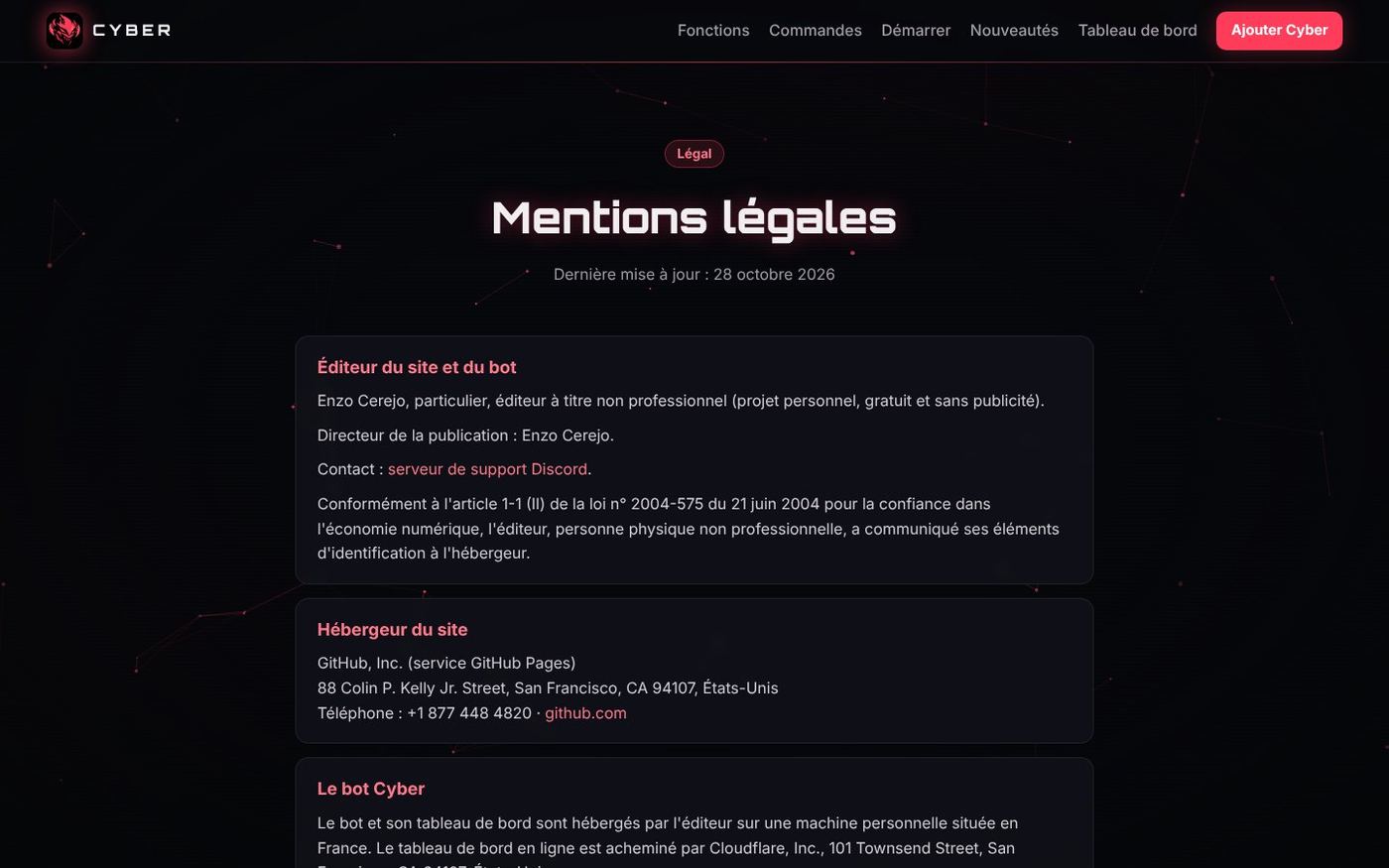
These pages are also declared in the Discord developer portal (Terms of Service URL and Privacy Policy URL), which shows them on the bot's profile and in the invite window.
Verification checklist
| Step | Status on 28/10/2026 |
|---|---|
Compliant code (/mesdonnees, 30-day purge) |
✅ done and tested |
| Legal pages online | ✅ (pull request #2 merged) |
| Justification texts for privileged intents | ✅ written in English, ready to copy |
| Application moved into a Discord team | ✅ (2FA mandatory) |
| Two-factor authentication on the account | to do by Enzo |
| Identity check (Stripe, 16 years minimum) | to do by Enzo |
| Disable the "Presence" intent if unused | to do by Enzo |
| Reach 75 servers to be able to apply | in progress |
Two portal fields were deliberately left empty after explanation: the role connection verification URL (Linked Roles, useless here) and the interactions endpoint URL (if you fill it in without a server built for it, every command stops answering, because Cyber uses the Gateway).
↑ Back to topChapter 10
Visual identity and community
Art direction
Cyber's logo is a red cyberpunk demon mask, with a small printed circuit trace on the forehead. The whole identity comes from this mask.

| Element | Value |
|---|---|
| Background | #08090D (bluish black), surfaces #12131A |
| Bot red | #FF5A6E (light #FF8A95, deep #FF3D5A) |
| Rare accents | green #3DDC84, blue #6C8CFF, gold #FFC457 |
| Headings | Orbitron |
| Text | Inter |
| Code | JetBrains Mono |
| Mood | "Cyber console": thin 32 px grid, red glows, circuits, slight glitch |
The pack of 57 prompts
To produce all the visuals with image AIs, a file of 57 prompts was written: a "prompt 0" that sets the style guide (to paste first), then one prompt per visual with its final size:
- bot identity: avatar, profile banner, horizontal logo;
- Discord server: icon, banner, invite background;
- embed banners per module (welcome, moderation, levels, tickets, giveaways…);
- website and panel: sharing image (og:image), favicon, login screen, 404 page;
- for later: level badges, role icons, event banners (maintenance, Christmas, Halloween), status widget, social networks, stickers.
Free generators output 1024 or 1536 px images: each image is then cropped and resized to the exact sizes required by Discord or the website.
A few embed banners already produced (1200 × 400):




The bot's profile on Discord
- Avatar and banner uploaded in the developer portal (the banner was redone as an opaque version, with centred text, so it looks right in the small view).
- Permanent status: "🌐 cyberbot.fr · /aide".
- Automatic bio with the number of servers, members and commands, updated by the bot itself.
- Links to the terms of service and the privacy policy.
- Application moved into a Discord team.
The Discord support server
A complete template was designed for the official server, in the "emoji + ・" style:
- 12 categories, 35 channels, 15 roles, with for each channel who sees it, who can write in it and which Cyber command makes it work (tickets, welcome, giveaways, suggestions, daily challenge, levels, temporary voice channels, logs, private backups);
@everyoneonly sees the welcome area until they click the/verificationbutton, which gives the Member role;- Academy, Staff and Beta categories (to test future custom modules), forum for bugs;
- no "Sanction" category:
/mutealready uses Discord's native timeout.
On 29 October, the server becomes bilingual. A newcomer arrives with the "Unverified" role and only sees a langue-language channel. They pick 🇫🇷 or 🇬🇧, read the rules in their language, accept them and receive "Membre" or "Member". They then see their language's channels and the shared channels. The English rules are published with a dedicated script, like the French ones.
Chapter 11
Problems encountered and lessons learned
The project log (chapter 2) tells the problems in the order they happened. This chapter groups them by type to draw lessons from them.
Technical problems
| Problem | Cause | Solution | Lesson |
|---|---|---|---|
/panelroles command rejected by Discord |
Required option placed after an optional one | Order fixed, rule checked by check.js |
Automate the checks you have already missed once |
| Commands visible on only one server | Registration on a fixed server ID | Automatic registration on every server the bot is on | What works in testing doesn't necessarily scale |
| Website images missing online | assets folder never sent to GitHub |
PUBLIER.bat publishes the whole folder with Git |
Publish with a tool, not by hand |
| New HTML with the old CSS | Browser cache | "Cache-busting" versions added automatically | Think of the cache whenever an update "doesn't work" |
Invalid OAuth2 redirect_uri |
index.html in the address and "Cyber" versus "cyber" |
Normalised address | A redirect URL must match character for character |
| English page without all the tabs | English menu written separately | Menu aligned with the French version | A translation is checked page by page |
| Changes blocked for hours | PC off or asleep, so nothing to install | Packages ready and tested in advance, PRs for the website | Prepare while away, install in one go on return |
| Website folder behind GitHub | PRs merged online while the PC was off | SYNCHRONISER-SITE.bat (sets aside then aligns with GitHub) |
Two ways to publish = remember to resync |
| Every command answered twice | Several copies of the bot were running (PC + host, or old windows) | Single instance via a local port, old copies closed at start-up | A service must know it is alone |
| Panel unreachable at the host | Name going through Cloudflare, then no inbound port on the machine | Outbound Cloudflare tunnel | An outbound connection gets through where an inbound one is blocked |
| HTTPS / HTTP mix | Website over HTTPS, panel over HTTP | Domain + tunnel = panel over HTTPS | The browser blocks "mixed content" |
| DNS error on the subdomain | Route not created yet, domain pending, Windows DNS cache | Create the route, wait for activation, ipconfig /flushdns |
DNS propagation and caches waste time: check in order |
| Error 1033 | No cloudflared connected (server deleted or bot off) |
Restart the tunnel from a machine that is on | Read the error code before panicking |
| Tunnel blocked at start-up | SHA-256 fingerprint of the Linux version used on Windows | Fingerprint of the right version | Integrity checking works, and it depends on the OS |
| "Bad gateway" | Old port + localhost translated to IPv6 ::1 |
http://127.0.0.1:3000 |
Always specify IPv4 when the service only listens on IPv4 |
| Data lost | Server deleted, no backup | Daily backups, copy in a private Discord channel, RESTAURER.bat |
Data that exists in only one place doesn't exist |
| Backup never sent | Sent only on creation, before the channel was configured | Resent until the backup has arrived | Test the "configured afterwards" case |
| Pink banner in the small view | Semi-transparent generated image | Opaque version, text in the safe zone | Check images in every display |
| Image AI quotas | Daily free limits | Production spread over time | Plan around your tools' constraints |
| Python missing from the PC | Build script in Python | Build reproduced by hand, then installation advised | List a project's prerequisites |
Human and organisational problems
This project was also a discovery: I don't code, and I had to learn to steer a technical project, understand what was proposed to me and do all the configuration myself (Discord, GitHub, OVH, Cloudflare, host).
| Situation | What happened | What I take from it |
|---|---|---|
| Images and AI | I asked an AI that doesn't generate images for a logo | Have it write a prompt for an image AI: each tool has its speciality |
| Token pasted in the conversation | "Nobody will have the conversation", so I didn't change it | A secret that has been shared is compromised: everything was regenerated on 28 October |
| Misconception about GitHub | I thought I could host the bot on GitHub like my portfolio | GitHub Pages only serves static pages: the bot needs a machine that is on |
| Conversation too long | I wanted to export it to go faster | An up-to-date summary (CONTEXTE-CLAUDE.md) is better than the whole history |
| Several projects on the same files | Automod, bilingual version and audit ready at the same time for the same bot | A clear installation order, a backup and a comparison at each step |
| One thread for each thing | The "bilingual bot" request hesitated between two threads | A written routing rule, applied without exception |
| Fear of the bill | "I don't want to spend my tokens" on an AI for the automod | Always ask for the real cost and start with the free solution |
| Copying a famous game | I wanted Google's dino game in Cyber's colours | You don't copy a protected creation: an original game does the job just as well |
| New vocabulary | Bot token or GitHub token? PR, merge, branch, ruleset, CNAME, TOTP… | Ask "what's that?" without embarrassment: every answer helped me progress |
| Where to put secrets | I asked where to put the token on GitHub | A secret never goes into a repository, even a private one |
| Too many approvals | Being asked "ok" at every step slowed everything down | Set a clear rule: reversible = do it, irreversible = ask me |
| Interfaces that change | Cloudflare menus reorganised, tabs impossible to find | A screenshot is worth more than a long description |
| Tool to connect to the PC | I couldn't find "Remote Control" | Give simple, targeted access (a single folder, Cyber) |
| Misunderstanding | "I haven't changed anything, what are you on about?" | Check the real state before claiming a step is done, and say so frankly when there's a mistake |
| Information to correct | Mini PC prices first underestimated, real need (Pi for my father, 8 GB for me) clarified along the way | Give all the context from the start, and accept that advice gets corrected |
| Student budget | New is too expensive | Refurbished and second-hand offer excellent value for money, with the right questions to ask the seller |
| Free host | Server deleted without explanation, waiting for an answer from support | Don't rely on a free service for something important: plan a plan B |
| Keeping track | Many topics in parallel (panel, website, audit, visuals, hardware) | One thread per topic, a single thread for audits, and a context file always up to date |
| Very long day | More than 15 hours of work on 28 October | Split into batches and note where you stop (e.g. "resume at prompt 19") |
What I would do the same way
- Test every version on my own servers before going further.
- Do a security audit before each important step (hosting, going live, verification).
- Keep a backup of every modified file.
- Never show a secret, even in a screenshot (I hid the values before sending).
What I would do differently
- Set up backups from the first day of hosting.
- Choose a host whose rules I understand (ports, tunnels allowed) before installing anything on it.
- Install the prerequisites (Python, Git) at the start of the project.
- Plan a tracking document like this one from the start, rather than rebuilding it afterwards.
Chapter 12
What's next for the project
Short term
- Finish the visuals (resume at prompt 19) and install them in the bot and on the website.
- Build the Discord support server from the template.
- Do the two-factor authentication and the identity check to prepare for Discord verification.
- Make Cyber known to reach the 75 servers needed to apply for verification.
- Translate the Academy (lessons, quizzes, glossary) into English.
- Decide on continuous hosting (Hetzner, about €4 a month) while waiting for the homelab.
The homelab (bought on 31 October)
- Purchase of a second-hand HP EliteDesk 800 G5 Mini (i5-9500, 16 GB RAM, 500 GB SSD) for €220, earlier than planned.
- Install Proxmox or Debian, then Docker.
- Bot in a container, with no exposed port, with the Cloudflare tunnel already set up (route to
127.0.0.1:<port>,cloudflaredfingerprint for the right architecture). - Scheduled reminders from 26 December to 3 January so nothing is forgotten.
- The same machine will serve as a lab for the BTS CIEL and the CCNA (pfSense, Windows Server, Linux VMs).
Custom modules ("cartridges")
The big project: letting a server receive a module built for it.
- The server asks for a module.
- Enzo builds it.
- He generates a secret ID tied to that server (useless anywhere else).
- The administrator enters it in the panel's "Public modules" tab ("Add a module").
- Cyber recognises the module and installs it.
Design points already identified: IDs that can't be guessed and are tied to a single server, modules isolated from the rest of the bot, data declared in the privacy policy.
When the bot grows
- AI layer for the automod (Claude Haiku), already written and set aside, if the need is confirmed.
COMMANDES=globaloption to register the commands once for every server.- Status widget on the website.
- Sharding, mandatory from 2,500 servers.
- Privileged intents justified to Discord.
Appendix
Glossary
| Term | Simple explanation |
|---|---|
| API | A service's entry point for programs (here, Discord's or Anthropic's) |
| Branch / Pull request / Merge | Working copy of a Git repository / proposed change / acceptance of that proposal |
| CNAME | DNS record that says "this name is an alias of that other name"; also the file that gives GitHub Pages its domain |
| Cloudflare Access | Access control in front of a site: you must prove your identity (email code, 2FA app) before seeing the page |
| Components V2 | Discord's recent message format, richer than classic "embeds" |
| CSP | Content Security Policy: the browser only runs allowed scripts (against XSS) |
| CSRF | Attack that makes a logged-in user perform an action without knowing it |
| DMARC / SPF | DNS records that prevent sending fake emails in a domain's name |
| DNS / A record | The Internet's directory / line that links a name to an IPv4 address |
| DNSSEC | Signing of DNS answers; must be disabled before changing DNS provider |
.env |
Local file that holds the secrets (token, keys); never published |
| Gateway | Permanent connection (WebSocket) between the bot and Discord |
| HMAC | Signature computed with a secret key: impossible to forge without the key (used against quiz cheating) |
| HSTS | Header that forces the browser to always use HTTPS |
| Intent | Type of events the bot asks to receive from Discord (some are "privileged") |
| Least privilege | Only give the rights that are strictly needed |
| OAuth2 | Logging in "with Discord" without giving your password to the site |
| Proxmox | System installed on a machine to run several isolated virtual machines |
| Pterodactyl | Hosting panel that runs each server in a Docker container |
| GDPR | European regulation on the protection of personal data (RGPD in French) |
| SHA-256 (fingerprint) | A file's "fingerprint": if a single byte changes, the fingerprint changes |
| SQLite | Database held in a single file, with no server to install |
| SSRF | Making a server send requests to its own internal network |
| TOTP | 6-digit code that changes every 30 seconds in an authenticator app |
| Cloudflare tunnel | Encrypted outbound connection that exposes a service without opening a port |
| WebP | Modern image format, much lighter than PNG or JPEG at the same quality |
| XSS | Injecting code into a web page shown to other users |
| Zero Trust | Approach where every access is checked, even if it comes from a "trusted" network |